
The short answer
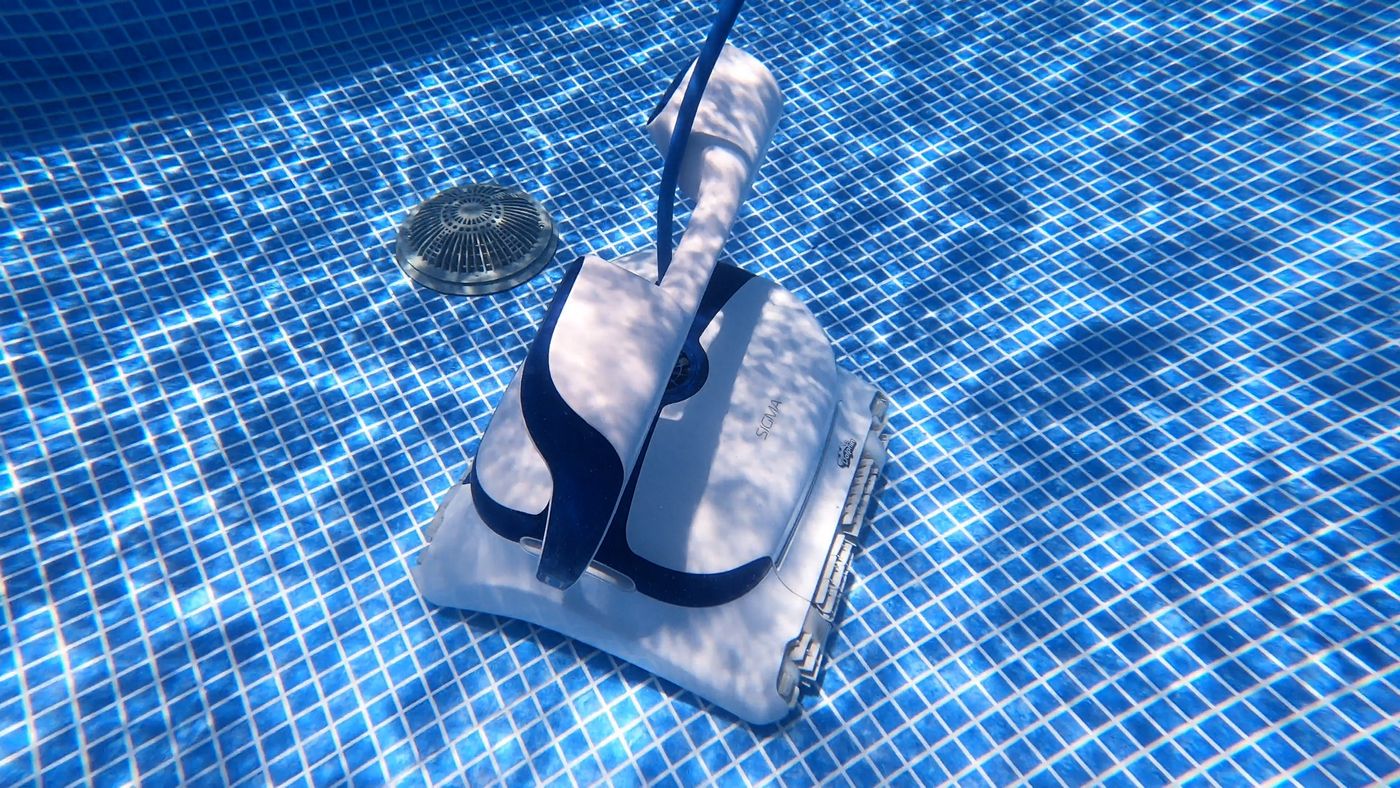
If the tracks keep moving while the Sigma is centered over the same raised drain, it is probably high-centered—not broken. Check whether the center-brush add-on is installed and clear, then test one cycle with the pool's circulation pump off.
Stuck on Main Drains
A Dolphin Sigma that repeatedly stops on the same raised main drain usually has a traction and clearance problem, not an electronics problem. The drain cover lifts the middle of the cleaner just enough for the tracks to lose firm contact with the pool floor. The tracks keep turning, but the robot cannot push itself forward or backward.
That condition is called high-centering. Raised anti-entrapment covers make it more likely because they are intentionally taller than older flat drain covers.
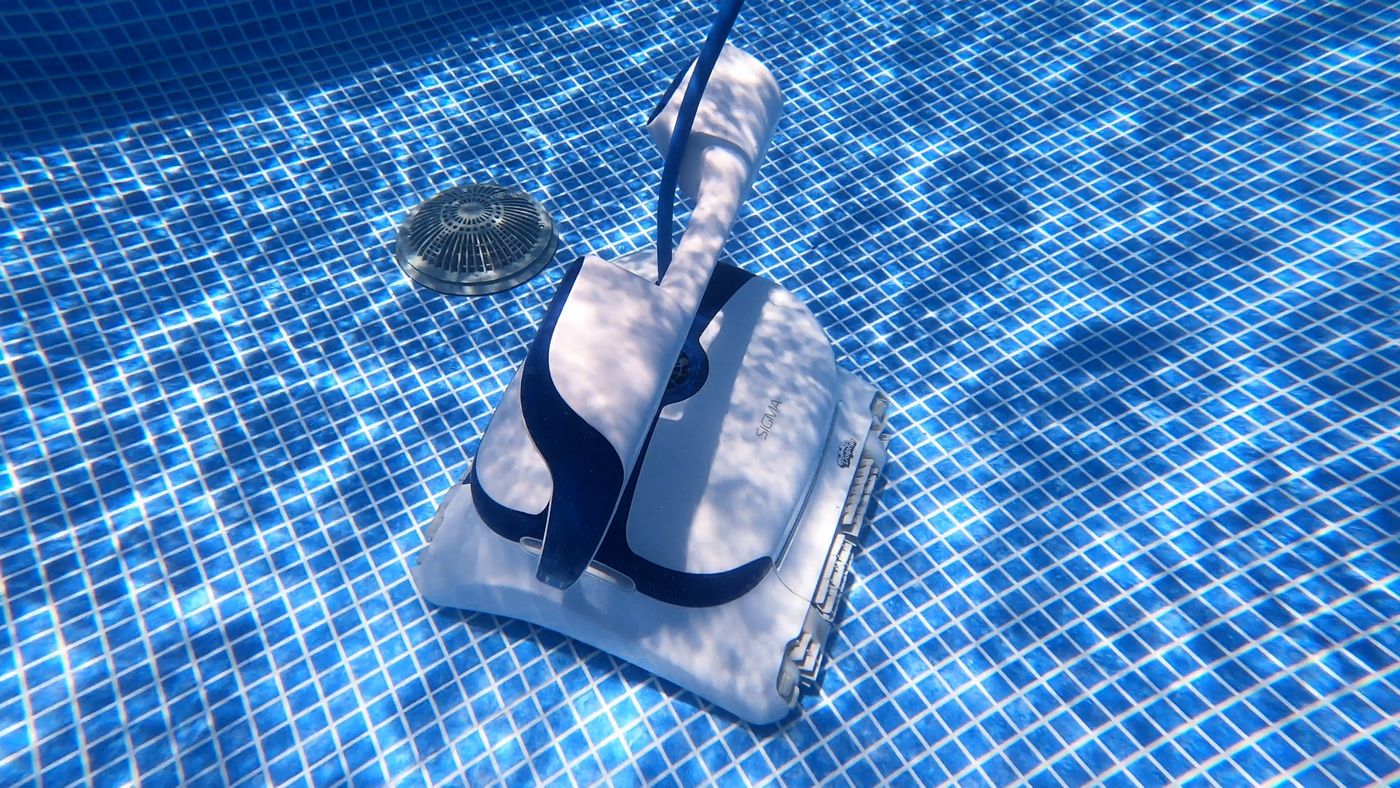
This is the Dolphin Sigma troubleshooting home. We are starting with the repeatable main-drain problem we have tested. We will add app, power, filtration, climbing, and movement fixes here as we verify them.
Safety first: disconnect the Sigma from its power supply before lifting, inspecting, or opening it. Never remove, flatten, drill, or otherwise modify a certified anti-entrapment drain cover. If the cover is loose, cracked, or missing hardware, keep swimmers out and call a pool professional.
Confirm the Drain Is the Cause
Watch one cleaning cycle from the deck before buying a part. A drain-clearance problem has a very specific pattern:
- The Sigma stops on the same drain or same side of a dual-drain setup
- The tracks continue moving, but the body stays in place
- The center of the cleaner is resting on the raised cover
- The robot works normally on the rest of the floor and still climbs walls
- Pulling lightly on the floating cable frees it, but it gets stuck again on a later pass
For one diagnostic cycle, turn off the pool's circulation pump so the main drain is not pulling water. Leave the drain cover in place and run the Sigma normally with no swimmers in the water.
- If the Sigma crosses the drain with the circulation pump off: suction through the pool drain is contributing. A pool professional can check valve balance, drain flow, and cover compatibility.
- If it still parks on the cover: the Sigma is high-centering on the shape of the drain. Continue with the center-brush check below.
This test isolates the pool system from the cleaner. It does not require touching the drain.
Check the Center Brush
The current Sigma has an optional center-brush kit designed for this exact geometry problem. It fills the open channel between the main scrubbing brushes and gives the cleaner another point of contact as it crosses a raised obstacle.

Remove the Sigma from the pool by its handle, let the water drain, disconnect the power, and place it upside down on a towel. Look at the long channel in the center of the underside.
If the center channel is empty
Your Sigma has the standard underside configuration. The center-brush add-on is the most direct model-specific fix we have tested. Order the kit that matches your exact Sigma revision from an authorized Dolphin dealer; the center-brush option is shown with the Sigma here.
If the center brush is already installed
Check that the roller is fully seated, the retaining panel is flush, and nothing is wrapped around the brush or its ends. Remove hair, string, leaves, and grit by hand after disconnecting power. Do not force the roller or run the cleaner with a loose panel.
While the Sigma is upside down, also check:
- Both tracks are seated evenly and have similar tension
- All four main brushes turn without debris wedged between them and the body
- The filter cartridges are clean and locked into place
- The floating cable is not looped under the handle or around a track
Install the Center Brush
The installation took us only a few minutes with a screwdriver. Follow the instructions supplied with your kit if they differ from these steps, because hardware can change between production runs.

- Disconnect and drain the robot. Unplug the power supply, disconnect the floating cable, lift the Sigma by its handle, and let the water drain before turning it over.
- Protect the top shell. Set the cleaner upside down on a folded towel or another clean, padded surface.
- Remove the center retaining panel. Back out the panel screws with the correct screwdriver and keep the screws together.
- Seat the brush roller. Align both end caps with the center channel and press the roller into place without forcing it.
- Reinstall the panel. Tighten the screws evenly until the panel sits flush. Do not overtighten into the plastic.
- Test a full cycle. Reconnect the cleaner, place it in the pool, release trapped air, and watch its first approach to the drain.

The brush does more than add scrub contact. As the drain raises the center of the chassis, the roller helps the Sigma keep moving until the tracks regain full contact on the other side.
Our result: after adding the center brush, our Sigma crossed the raised drain on repeated daily runs without parking on top of it.
If It Still Gets Stuck
Work through these checks in order. Change one thing at a time and watch a full cycle so you know which adjustment mattered.
1. Clean the filters and running gear
Rinse both filter cartridges thoroughly. Clear hair and string from the tracks, brushes, and center roller. A packed filter or dragging track can reduce the cleaner's ability to recover when its weight shifts over an obstacle.
2. Straighten the floating cable
Unplug the cable, lay it out straight, and remove twists before the next run. Feed only the amount of cable the Sigma needs to reach the farthest point in the pool. Excess cable can pull across the handle or tighten as the robot turns near the drain.
3. Check the drain cover from the deck
Look for a cover that is cracked, loose, tilted, or surrounded by a ridge of scale. Do not enter the pool to alter it and do not replace it with a flat cover. A pool professional should verify that any replacement remains compliant with current anti-entrapment requirements.
4. Use a compatible drain ramp only after checking fit
Clip-on drain ramps can soften the transition around some raised covers. Compatibility matters: a clip must not loosen the cover, block its openings, or defeat its safety design. Confirm the cover model and ask a pool professional when in doubt. Our general main-drain guide explains when these clips make sense.
5. Record the failure before requesting service
Take a 20–30 second video showing the Sigma approach the drain, stop, and spin its tracks. Include a clear view of the cover and the underside of the cleaner. That makes it much easier for a dealer or repair center to separate a pool-geometry issue from a drive problem.
When It Is Not a Drain Problem
Stop treating this as a drain-clearance issue if any of these are true:
- One track does not move while the other one does
- The Sigma stops on open floor away from the drain
- The power supply shuts off or reports a fault
- The floating cable, connector, or power cord is damaged
- The cleaner no longer climbs walls anywhere in the pool
- A track repeatedly comes off its guide
- The center brush or retaining panel will not stay secured
Those symptoms point to power, drive, track, cable, or internal service needs. Disconnect the cleaner and contact an authorized Dolphin service center instead of repeatedly restarting it. Continuing to run a stalled drive can turn a small repair into a larger one.
Frequently Asked Questions
Does getting stuck on a drain mean my Dolphin Sigma is broken?
Usually not. If both tracks still move and the problem happens only on the same raised cover, the Sigma is most likely high-centered. A drive or power fault usually appears in more than one part of the pool.
Does every Sigma need the center brush?
No. Many pools have low-profile covers that the standard Sigma crosses without trouble. The add-on is most useful when the cleaner repeatedly hangs on a raised anti-entrapment cover.
Can a software or app update fix this?
Not by itself. Navigation can change how a robot approaches an obstacle, but software cannot create traction once the drain lifts both tracks off the floor. This is primarily a physical clearance problem.
Should I leave the pool pump off whenever the Sigma runs?
The pump-off cycle is a diagnostic test. Once the Sigma crosses reliably, return the pool system to its normal schedule and verify another cleaning cycle. If drain suction alone causes the failure, have a pool professional review the hydraulic setup.
Can I replace the raised cover with a flat drain cover?
No. Raised anti-entrapment covers are safety equipment. Never substitute or modify one simply to accommodate a cleaner. Any drain-cover work should be done with a correctly rated, compatible cover by a qualified pool professional.
Still stuck after every check?
Compare your symptom with the broader drain guide, then use your short video when you contact the dealer or an authorized repair center.