
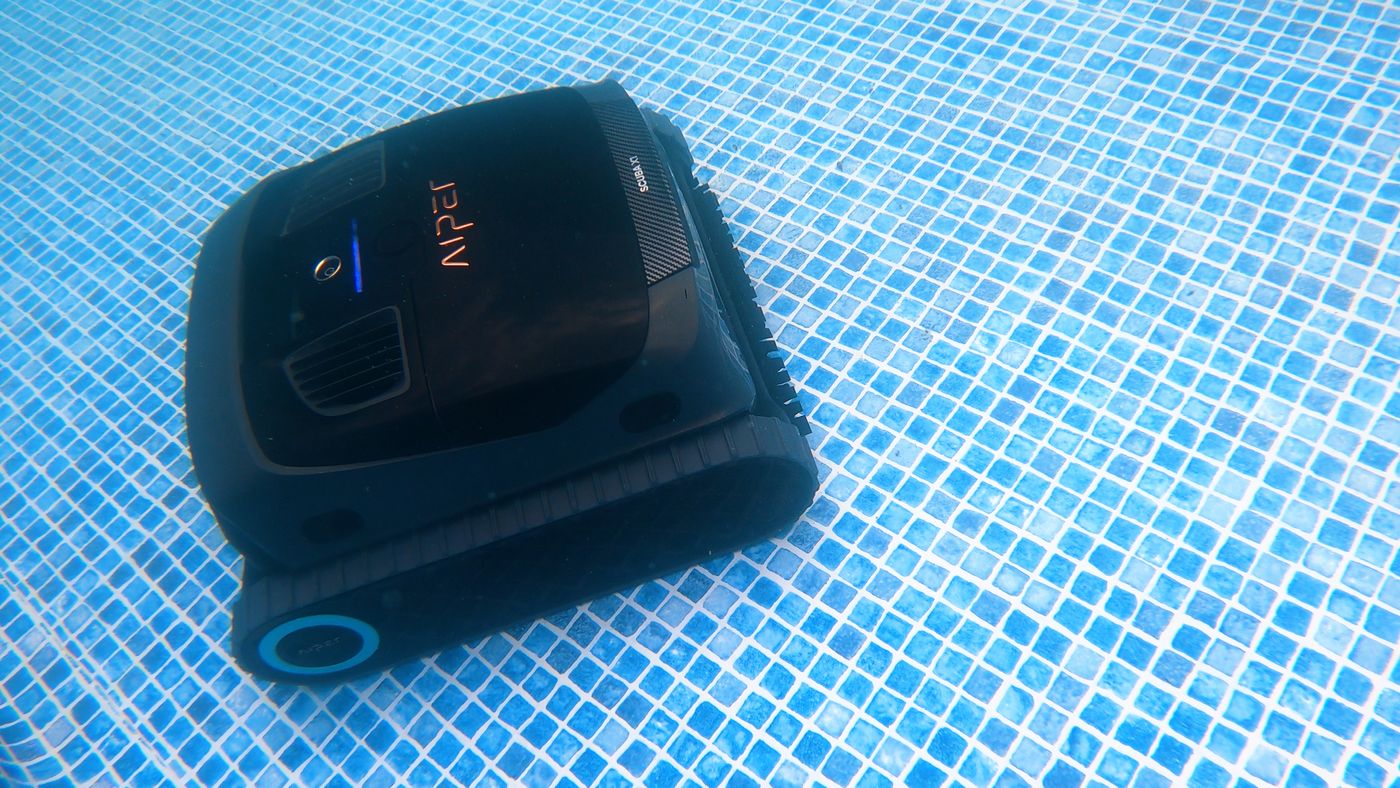
The short answer
Most Aiper Scuba X1 problems trace back to three things: a filter sealed with fine debris, a battery that is not fully charged, or air trapped in the body. Rinse the filter until the water runs clear, charge until the light shows full, and let the air out before the next run.
This is the troubleshooting home for the Aiper Scuba X1. It is a cordless, battery-powered robot that cleans the floor, walls and waterline. Below are the 12 problems owners run into most, each with the checks we would make first and the point where it stops being a do-it-yourself fix.
Safety first: take the Scuba X1 out of the water and switch it off before you open the filter, touch the brushes, or reach near the impeller. Never charge it while it is wet at the charging contacts, and never open the sealed battery or motor housing.
Scuba X1 Quick Checks First
Run through these before you chase a specific symptom. Between them they clear up most of what goes wrong with a Aiper Scuba X1.
- Charge it all the way. Leave the Scuba X1 on charge until the light shows full, not just until it turns on. A partial charge causes short runs, weak climbing, and robots that stop in the middle of the pool.
- Rinse the filter until the water runs clear. A filter that looks clean can still be sealed with fine dust. Most pickup, climbing, and early-shutoff complaints end here.
- Let the air out. Hold the robot under the surface and rock it until the bubbles stop before you let go. Trapped air makes it float, tip, and lose grip.
- Rinse it and seat it squarely on the charger. Rinse the Scuba X1 with fresh water after every run, dry the charging area, and make sure it sits fully in place on the charger. A robot that is a little off will look docked and never fill.
- Check the water. Algae, very cold water, and chemistry far out of range all make a robot slip. Fix the water before you blame the machine.
Aiper Scuba X1 at a glance
- Type
- Cordless, battery powered
- Cleans
- Floor, walls and waterline
- Filter
- Top-loading filter box with a replaceable MicroMesh ultra-fine liner
- Battery
- 180 minutes rated, 4-hour charge, 7800 mAh
- App
- Aiper app, added by Bluetooth or QR code on a 2.4 GHz or mixed 2.4/5 GHz Wi-Fi network
- Built for
- In-ground pools up to 2,150 sq ft, up to 10 ft deep
- Weight
- 26.4 lb dry is the figure in our review, which was written…
- Warranty
- 24 months

Scuba X1 Won’t Turn On
- No lights when you hold the power button
- Dead after a full night on the charger
- Will not start on a cold morning
- Battery too low
- Battery too cold or too hot
- Button tapped instead of held
- Controller in a deep sleep or locked up
- Hold the button for 2 seconds. A short press only changes the cleaning mode. On and off need a two-second hold.
- Charge it fully. Put it on the dock or plug in the charger and wait for the status LED to go from pulsing to solid green. That takes about 4 hours from empty.
- Check the temperature. Aiper's manual says the X1 should only be operated between 50 and 104 F. A robot left in a cold garage or in direct sun may refuse to start until it is back in that range.
- Try a long press. Aiper's charging guide suggests holding the power button for 10 seconds or more to wake a unit that will not respond. Be aware that on the X1 a 10-second hold is also the factory reset, so you will need to set up Wi-Fi again.
- Try it while on charge. Aiper also suggests unplugging the charger, waiting a minute, reconnecting it and trying to power on while it is still charging. Check that the button clicks and is not stuck.
Stop and call support if: it will not power on after a full charge within the temperature range and a 10-second hold.
Scuba X1 Won’t Charge
- Status LED does not pulse on the dock
- No light on the charger brick
- LED unchanged after half an hour
- Wet or dirty contacts under the robot or on the dock
- Robot not sitting squarely on the dock
- Charger unplugged, faulty or on a dead outlet
- Battery too hot or too cold
- Battery deeply discharged after long storage
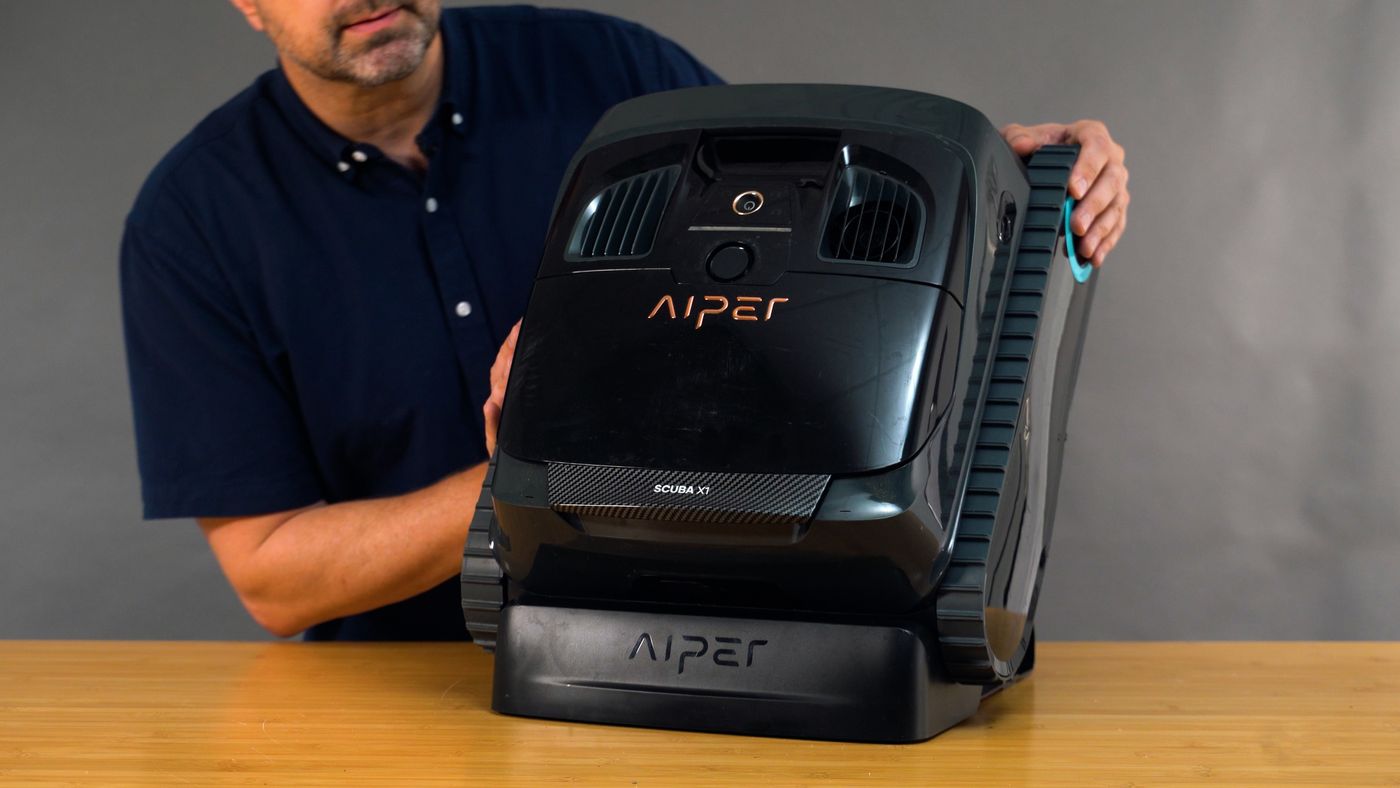
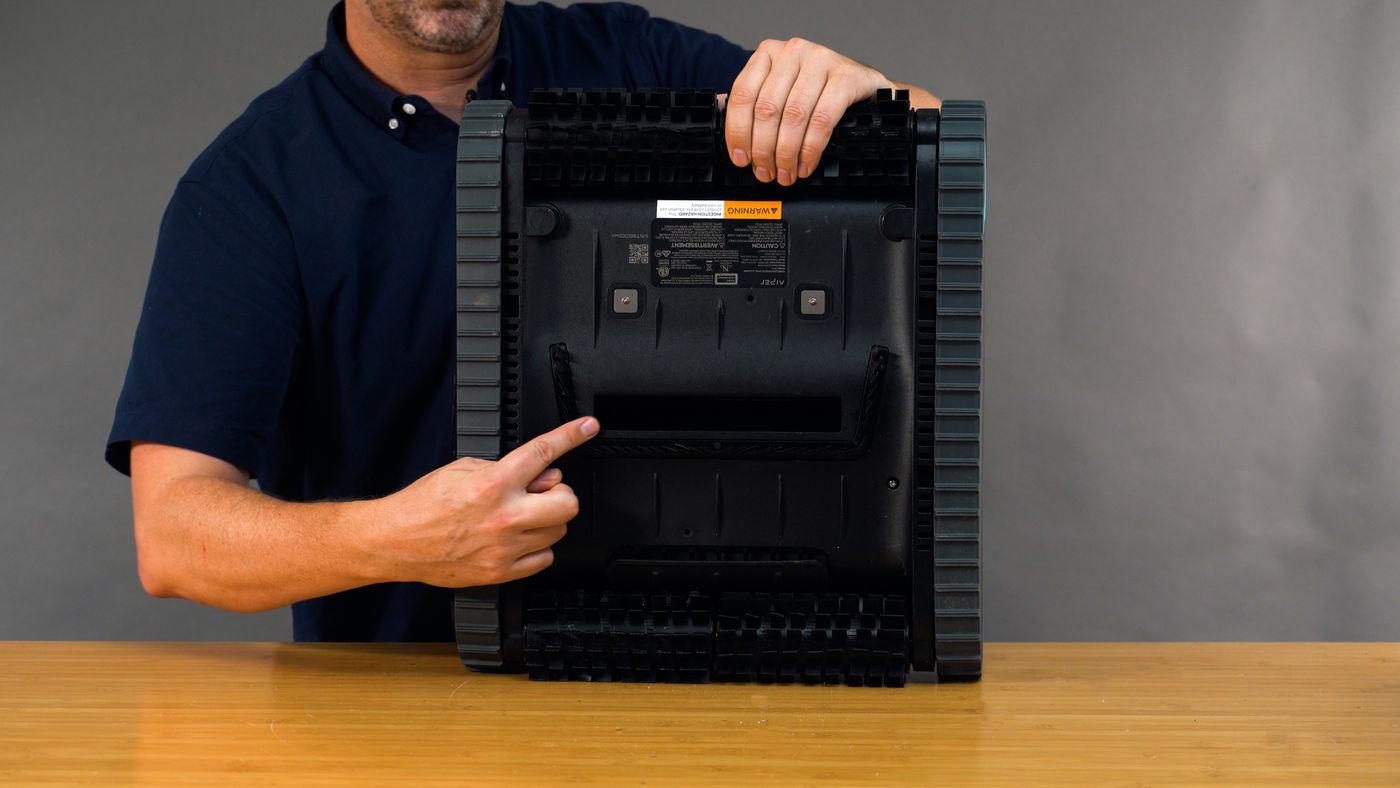
- Dry the robot and the dock. Aiper says never to put a wet robot on the dock. Let it drain, then dry the metal contacts on the underside with a cloth or tissue. If you use the charging port instead, take off its cover and dry inside it.
- Check the charger light. The manual's first check is the indicator on the charger itself. If the plug is in a live outlet and that light is off, the charger is probably faulty.
- Reseat it on the dock. The charger's cable goes into the port on the dock and the adapter into the wall. Set the robot down squarely so its contacts meet the dock's. The status LED should start pulsing.
- Try the charging port. The X1 can also be charged directly. Plug the charger into the robot's charging port. If it charges this way but not on the dock, the dock or its contacts are the problem.
- Charge between 50 and 104 F, out of the sun. The battery will not accept a charge when it is too hot or too cold. Charge in the shade, at least 11.5 ft from the pool, and do not use an extension cord.
- Clean corroded contacts. Aiper's guide says to inspect the contacts for corrosion, which salt water speeds up, and wipe them with a dry cloth. Rinse the robot with fresh water after salt-pool use and dry the contacts before charging.
Stop and call support if: the charger light is off on a good outlet, the LED still does not change after cleaning the contacts, or the robot will not charge after sitting unused for months.
Scuba X1 Stops Before the Pool Is Clean
- Parks at the pool edge with a solid red LED
- Sinks, sits still and powers off after a few minutes
- Stops with the LED flashing red
- Battery ran down (solid red)
- Jammed propeller (flashing red)
- Debris around a tread or roller stalling a motor
- Battery that shows full but sags under load
- Read the LED before you lift it. Solid red means the battery dropped under 15% and the robot ended the task and parked. Flashing red means the propeller is jammed or the robot is stuck.
- Clear the treads and rollers. Switch it off and check both treads and the roller brushes for hair, string and leaves. Turn the treads by hand; they should move freely.
- Clear the propeller. Pry the drain cover open with a flathead screwdriver, lift off the propeller cover underneath and pull out anything wound around the propeller. Refit the propeller cover, then the drain cover.
- Recharge to solid green. Aiper's guide for an X1 that sinks and then shuts off says to recharge until the LED is solid green, not still pulsing, then hold the power button for 10 seconds to reset the controller before the next run.
- Time the next run. Note how long it runs before it stops. Support will ask, and a robot that quits within minutes of a full charge has a battery problem that no reset fixes.
Stop and call support if: it still shuts down mid-cycle after clearing debris, a full recharge and a reset. Aiper asks for the serial number and a short video.
Scuba X1 Turns On but Won’t Run
- LED green, motors blip for a second, stop and try again
- Sits on the floor without driving
- One tread turning and the other not
- Tread or roller blocked, so the controller aborts its start
- Battery voltage dropping under load
- Robot switched on but not yet submerged
- Drive motor fault
- Put it in the water. The X1 only starts its task after it has been underwater for a short time. Pick the mode on the deck, then lower it in straight away, top up, never upside down.
- Check for a blockage. Take it out and switch it off. Clear both treads and the rollers and make sure everything turns by hand.
- Reset the controller. Aiper's guide for this start-stop pattern says to hold the power button for 10 seconds until the LED flashes. That is the factory reset, so it also clears your Wi-Fi setup.
- Charge to solid green. A pulsing LED means it is still charging. Wait for solid green before you test again.
- Test in clear water. Place it in an open, debris-free part of the pool and watch for two or three minutes. If it runs continuously, the problem is cleared.
Stop and call support if: the start-stop pattern continues after the reset and a full recharge. Aiper wants a short video showing the LED and the pattern.
Scuba X1 Won’t Climb Walls or Reach the Waterline
- Stays on the floor all cycle
- Climbs to mid-wall and stops
- Skips the waterline
- Floor mode selected
- Battery under half; Smart mode plans its route by battery level
- Full filter box cutting suction
- Rough or slippery wall surface
- Debris on the treads or rollers
- Choose a mode that climbs. Smart mode cleans walls and floor in sequence. Wall mode does only the walls in an up-and-down route. Waterline mode travels along the waterline. Floor mode never climbs.
- Start on a full charge. Wait for solid green. Aiper's guide notes that wall climbing uses far more power than floor cleaning, and Smart mode changes its plan once the battery is below half.
- Empty the filter box. A full box or a clogged liner cuts the suction that holds the robot against the wall.
- Clean the treads and rollers. Aiper lists debris on the drive rollers as a cause of stopping mid-wall. Clear them and wipe off any slime.
- Run a wall-only cycle in deep pools. In pools deeper than about 8 ft, Aiper says the X1 may not reach full wall height on one charge and suggests a second cycle in a wall mode.
Stop and call support if: it will not climb at all in Wall mode on a full charge with a clean filter box and clean treads.
Scuba X1 Not Picking Up Debris
- Leaves swirl around the intake and stay in the pool
- Robot tilts in the water
- Fine dirt still there after several cycles
- Filter box full
- MicroMesh liner clogged
- Liner fitted when the pool is full of large debris
- Propeller jammed (flashing red)
- Modest suction and a narrow intake
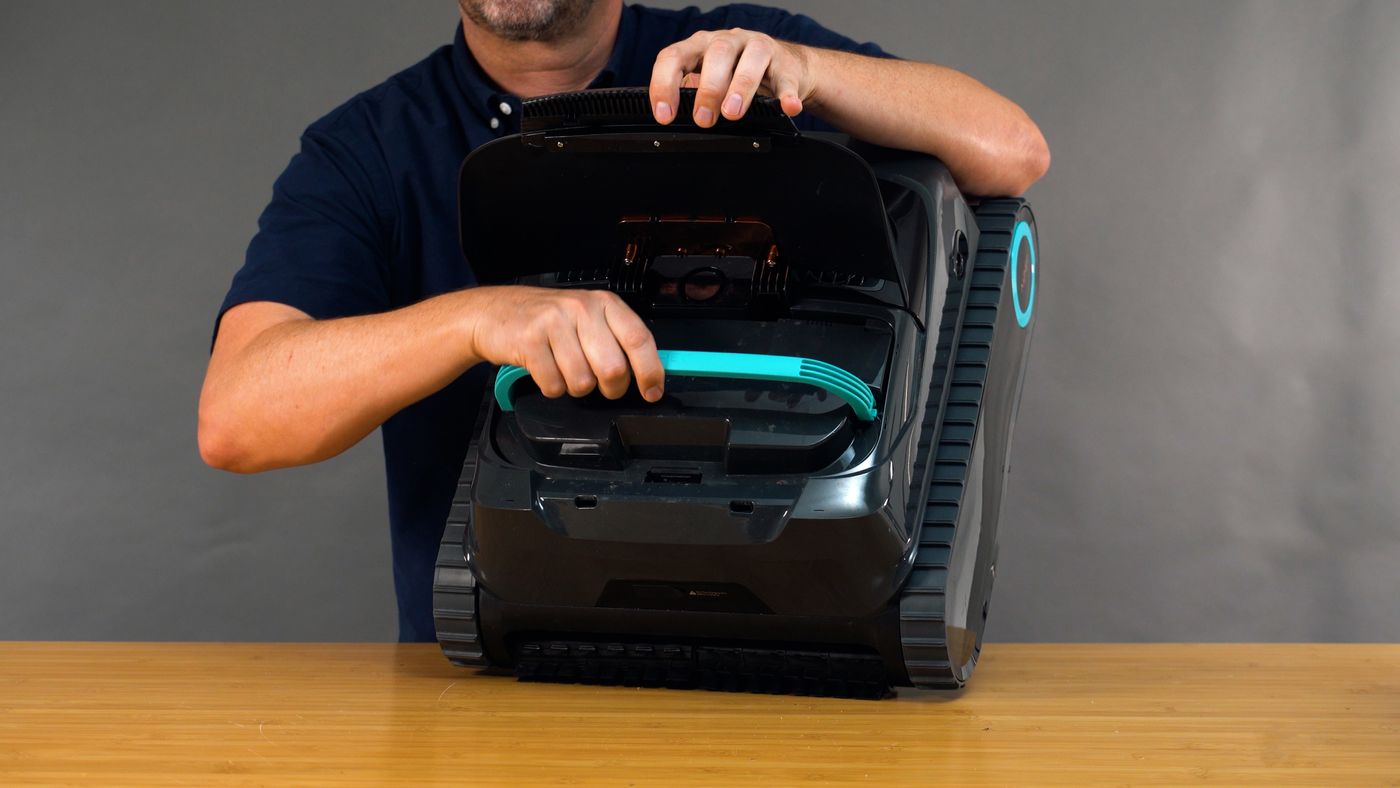
- Empty the filter box. Set the robot on a flat surface, lift the top shell and pull the filter box out by its handle. Press the latch, open it and empty it. Aiper's manual links a tilting robot and weak cleaning to a full box.
- Take the liner out and rinse both parts. Unhook the liner's rubber strip from the slots at A, B, C and D. Rinse the liner inside and out and the box separately. We found debris caught in the folds, so use a strong hose nozzle.
- Refit the liner on all four tabs. Line up the A mark on the liner with the A on the box, pull each corner of the rubber strip into its slot and check the strip is seated all the way round. A gap lets water go around the filter.
- Use the right filter for the job. Aiper says to use the box with the MicroMesh liner when debris is light and the water is cloudy, and the box alone when there are lots of leaves or sand. Replace the liner about every 30 uses.
- Check the propeller. If the LED is flashing red, pry off the drain cover, remove the propeller cover and clear the propeller.
Stop and call support if: flow from the top outlet stays weak with a clean box and a clear propeller.
Scuba X1 Gets Stuck
- Sits on the main drain
- Hangs at the waterline
- Wedges in a corner or runs into things it should avoid
- Pool pump running, so the drain holds it
- A small ledge or fitting at the waterline the sensor missed
- Dirty sensor lens
- Loose items in the pool
- Full filter box, so it loses grip and makes no progress
- Wait before you step in. Aiper's manual says a robot caught on the drain will free itself, and one stuck at the waterline in Waterline mode will sink within a minute and carry on. Its support guide says to give a corner about 30 seconds.
- Turn the pool pump off. Aiper says not to open the pool drain while the robot is cleaning and not to run it alongside other pool equipment.
- Wipe the sensor lens. If it has stopped avoiding obstacles, clean the sensor lens with a soft, dry cloth. That is the manual's fix for that symptom.
- Clear the pool and empty the filter box. Remove toys, floats and loose hoses. Then rinse the filter box; Aiper's guide says a fully blocked box can make the robot lose suction and slide in place on a smooth floor.
- Bench test the drive. If it sticks in the same place every time, set it on a smooth surface out of the pool, switch it on briefly and see whether both treads turn.
Stop and call support if: one tread or roller stays still in the bench test, or the LED flashes red with nothing blocking it.
Scuba X1 Misses Spots
- Thin strips of debris left along the edges of its path
- Walls done but floor unfinished, or the reverse
- Larger debris left behind
- Narrow intake, so passes need to overlap
- Battery ran out before the plan finished
- Wrong mode for the dirty area
- Dirty sensor lens
- Use Floor mode for a dirty floor. Floor mode drives an S-shaped route and does not spend battery on walls. Smart mode splits the charge between walls and floor.
- Run a second pass. We saw small debris left along the edges of each strip. A second floor cycle after a recharge picks up most of it.
- Start full. Charge to solid green. On a solid blue LED it starts with less than half a battery and will not finish a large pool.
- Clean the sensor lens. Wipe the lens with a soft, dry cloth so it can see walls and obstacles properly.
Stop and call support if: it repeatedly leaves the same large area untouched on a full charge with clean sensors.
Scuba X1 App Won’t Connect
- Setup fails or reports a wrong password
- Wi-Fi light flashing green or off
- App shows the robot offline once it is in the pool
- Robot is underwater
- Phone or router on 5 GHz only
- Network setup window timed out
- Robot still linked to a previous owner's account
- Expect it to drop in the water. In our testing the connection was lost as soon as the robot went under. Set the mode and check the battery in the app on the deck. Aiper sells a HydroComm Pro module for underwater communication, and its setup guide is written for the X1 Pro and Pro Max.
- Use a 2.4 GHz network. The manual asks for a 2.4 GHz or mixed 2.4/5 GHz network. Aiper's Wi-Fi guide says a wrong-password error usually means the robot is being pointed at a 5 GHz band, and suggests splitting a combined network into separate names.
- Re-enter network setup. The X1 goes into setup mode the first time it is switched on. If that window has passed, hold the button for 5 seconds to start it again, then finish in the app within a few minutes.
- Add it by QR code. In the Aiper app tap the plus sign and choose Add via QR Code, then scan the code on the robot. Aiper says this route often gets past stubborn connection errors. Bluetooth setup is the alternative.
- Factory reset a second-hand unit. Hold the button for 10 seconds; the LED pulses yellow while it resets. Then add it to your account from scratch.
Stop and call support if: the robot is still tied to another account after a reset. Give Aiper the serial number and ask for it to be unbound.
Scuba X1 Hard to Get Out of the Pool
- Hook and pole flex under the weight
- Water pours out as it comes up
- Parked on the floor at the far edge
- Heavy robot, heavier full of water
- No cord to pull
- Lifted before it drained
- Let it park. When the battery is low the LED goes solid red and the X1 stops and parks at the edge of the pool. That is the place to collect it.
- Hook the handle. Fit the hook to a standard pool pole, which is not included, and get it fully under the robot's handle before you lift.
- Bring it to the surface, then take over by hand. The hook felt flimsy to us under the full weight. Raise the robot to the waterline, grab the handle yourself and let the water drain before you lift it out.
- Drain before charging. Aiper says to let it drain fully before storing or charging, and to dry the underside contacts before it goes on the dock.
Stop and call support if: the hook is cracked or bent.
Scuba X1 Short Battery Life
- Parks well before 180 minutes
- LED blue rather than green at the start
- Battery percentage falls quickly once it starts working
- Wall and waterline cleaning use more power than floor cleaning
- Taken off the charger before solid green
- Clogged filter box
- Battery wear, or a pack that sags under load
- Charge to solid green. Pulsing green only means more than half. Give it the full 4 hours.
- Pick the mode for the job. Runtime dropped for us whenever it was climbing. Use Floor mode when the walls do not need doing.
- Keep the filter box clean. Empty the box and rinse the liner after every run so the pump is not pushing against a blockage.
- Store it charged. For the off-season Aiper says to charge it fully, clean and dry it, close the charging port cover, store it cool and dry, and recharge every six months.
Stop and call support if: a full charge gives only minutes of running, or the battery shows full and then collapses under load. The battery is internal and not user-replaceable.
Scuba X1 Error Lights
- Status LED flashing red
- Status LED solid red
- Status LED pulsing yellow
- Wi-Fi light flashing green
- Jammed propeller or a stuck robot (flashing red)
- Low battery (solid red)
- Reset or firmware update in progress (pulsing yellow)
- No internet connection (Wi-Fi light flashing green)
- Flashing red: clear the propeller. Switch it off. Pry open the drain cover on top with a flathead screwdriver, lift off the propeller cover and remove whatever is tangled in the propeller. Refit both covers in order.
- Flashing red: free the drive. The same light also means the robot is stuck. Clear the treads and rollers and move it away from whatever trapped it.
- Solid red: recharge. The battery is under 15% and the robot is about to shut down. If the task ended early, this is why.
- Pulsing yellow: wait. It is either resetting after a 10-second button hold or installing an update. Keep it on the deck, ideally on the dock within Wi-Fi range, until the light changes.
- Wi-Fi light flashing green: fix the network. The robot is on but cannot reach the internet. Follow the prompts on the app's setup screen.
Stop and call support if: the LED keeps flashing red with a clear propeller and free treads.
Scuba X1 Lights and What They Mean
These are the indicator states listed in the official Aiper material for the Aiper Scuba X1. If what you see is not here, check the manual for your exact production run before acting on it.
Leave it on the dock or charger. Allow about 4 hours from empty.
Take it off the charger and run it.
Leave it alone on the deck until the light changes. Do not switch it off or put it in the pool mid-update.
Take it out, switch it off and clear the propeller under the drain cover on top. Check the treads and rollers for debris too.
Retrieve it and recharge fully.
Fine for a short run. Recharge first if you want a full cycle with wall cleaning.
Nothing to do.
Finish setup in the Aiper app.
Follow the troubleshooting steps on the app's setup screen and check you are on a 2.4 GHz network.
If it is off on the deck, hold the button for 5 seconds to re-enter network setup.
When to Call Aiper Support
Stop troubleshooting and get the Scuba X1 looked at if any of these are true:
- The same fault comes back right after a full clean and a restart
- You see water inside a sealed compartment, or the robot has become noticeably heavier
- There is a burning smell, a melted connector, or visible corrosion on the electrical contacts
- The battery will not take a charge, or the runtime has dropped to a fraction of what it was
- A motor is silent or grinding with nothing blocking it
Before you call, write down the serial number, find your proof of purchase, and record a 20 to 30 second video of the problem. A clip of the robot failing, plus a clear shot of any light on the robot or charger, gets a warranty claim moving faster than any description.
- Support: Aiper support
- Phone: +1 (866) 850-0666 (Mon-Fri, 9 AM-6 PM Eastern, per Aiper's FAQ page)
- Email: service@aiper.com
- Manual: Aiper Scuba X1 user manual
- Warranty: 24 months
24-month warranty on the battery and motor from the purchase date. Aiper asks for the order number or proof of purchase and the serial number. Damage from use outside the stated water conditions is not covered. Claims go through aiper.com/us/process-a-warranty.
Aiper Scuba X1 Troubleshooting FAQ
What does a flashing red light mean on the Aiper Scuba X1?
Aiper's manual lists it as a propeller malfunction or a stuck robot. Open the drain cover with a flathead screwdriver, remove the propeller cover and clear the propeller, then check the treads. A solid red light is different: it means the battery is under 15%.
How do I reset the Aiper Scuba X1?
Hold the button for 10 seconds. The status LED pulses yellow while the robot restores its factory settings. This clears the Wi-Fi setup, so you will need to add it to the app again.
Why does my Aiper Scuba X1 lose its app connection in the pool?
Wi-Fi and Bluetooth do not carry through water, so the app drops out when the robot submerges. We saw exactly that in testing. Choose your mode before you put it in.
How does the Aiper Scuba X1 charge?
Two ways. It can sit on the included charging dock, which charges through metal contacts on the underside, or the charger can plug straight into the robot's covered charging port. Dry the contacts or the port first. The LED pulses while charging and goes solid green in about 4 hours.
Why does my Aiper Scuba X1 stop at the edge of the pool?
When the battery falls below 15% the LED turns solid red, and the X1 ends its task and parks at the pool edge so you can hook it out. Recharge it fully before the next run.
How often should I replace the Aiper Scuba X1 MicroMesh filter?
Aiper calls the MicroMesh liner a consumable and says to replace it about every 30 uses. Surface wear after a few runs is normal and does not affect how it filters.
Still stuck after every check?
Go back to our review for how the Scuba X1 is supposed to behave, or contact Aiper with your serial number and a short video of the problem.