
The short answer
Most Aiper Seagull 1000 problems trace back to three things: a filter sealed with fine debris, a battery that is not fully charged, or air trapped in the body. Rinse the filter until the water runs clear, charge until the light shows full, and let the air out before the next run.
This is the troubleshooting home for the Aiper Seagull 1000. It is a cordless, battery-powered robot that cleans the floor only. Below are the 10 problems owners run into most, each with the checks we would make first and the point where it stops being a do-it-yourself fix.
Safety first: take the Seagull 1000 out of the water and switch it off before you open the filter, touch the brushes, or reach near the impeller. Never charge it while it is wet at the charging contacts, and never open the sealed battery or motor housing.
Seagull 1000 Quick Checks First
Run through these before you chase a specific symptom. Between them they clear up most of what goes wrong with a Aiper Seagull 1000.
- Charge it all the way. Leave the Seagull 1000 on charge until the light shows full, not just until it turns on. A partial charge causes short runs, weak climbing, and robots that stop in the middle of the pool.
- Rinse the filter until the water runs clear. A filter that looks clean can still be sealed with fine dust. Most pickup, climbing, and early-shutoff complaints end here.
- Let the air out. Hold the robot under the surface and rock it until the bubbles stop before you let go. Trapped air makes it float, tip, and lose grip.
- Rinse and dry the charging contacts. Pool water left on the charging port or contacts corrodes them. Rinse with fresh water and dry them before every charge.
- Check the water. Algae, very cold water, and chemistry far out of range all make a robot slip. Fix the water before you blame the machine.
Aiper Seagull 1000 at a glance
- Type
- Cordless, battery powered
- Cleans
- Floor only
- Filter
- One flat filter tray under the top body
- Battery
- Rated 90 minutes per charge
- App
- No app
- Built for
- Flat-floored pools up to 1,076 sq ft, maximum water depth 8.2 ft, maximum floor slope 15 degrees per Aiper's spec sheet
- Weight
- 12.13 lb
- Warranty
- 12 months, battery and motor only
Seagull 1000 Won’t Turn On
- No blue light when the knob is turned to ON
- Light comes on but it never moves
- Flat battery
- Knob turned on out of the water
- Battery damaged by long storage
- Drive unit fault
- Put it in the water first. The Seagull 1000 is meant to be switched on after it is in the pool. Lower it in, then turn the knob on top to ON. The light should go steady blue and it should start moving about 15 seconds later.
- Charge it fully. Turn the knob to OFF, open the protective cap, dry the pins and connect the charger. Wait for the charger light to go from red to green, which takes 5 to 6 hours.
- Check the charger is really charging. The charger shows green when it is plugged into the wall but not properly connected to the robot. A red light is the only proof that current is going in.
- Consider storage damage. Aiper warns that leaving it uncharged for a long period can drop the battery below its protection voltage for good.
Stop and call support if: it will not power on after a full charge, or with the charger attached. Aiper's answer is a replacement drive unit or robot.
Seagull 1000 Won’t Charge
- Charger light stays green on a flat robot
- Charger light off
- No light on the robot while charging
- Knob left on ON
- Wet or corroded charging pins
- Charger plug not seated
- Faulty charger or battery
- Turn the knob to OFF. The 1000 has to be switched off before it will charge.
- Dry the pins. Open the protective cap and wipe the charging pins with a paper towel or cotton swab. Give it a few minutes to dry before plugging in. Aiper asks for this after every use.
- Read the charger, not the robot. The robot shows no light at all while charging, which is normal. Red on the charger is charging, green is finished or not connected.
- Close the cap afterwards. Press the protective cap back over the charging port before the robot goes back in the pool.
Stop and call support if: the pins are corroded (Aiper replaces the drive unit for that), or the charger never shows red when connected to a flat robot.
Seagull 1000 Short Battery Life
- Runs far less than 90 minutes
- Blue light flashing quickly early in the run
- Charge time creeping up
- Unplugged before the charger went green
- Clogged filter tray
- Battery wear
- Stored flat
- Charge to green. A full charge is 5 to 6 hours. Do not judge runtime until the charger light has turned green.
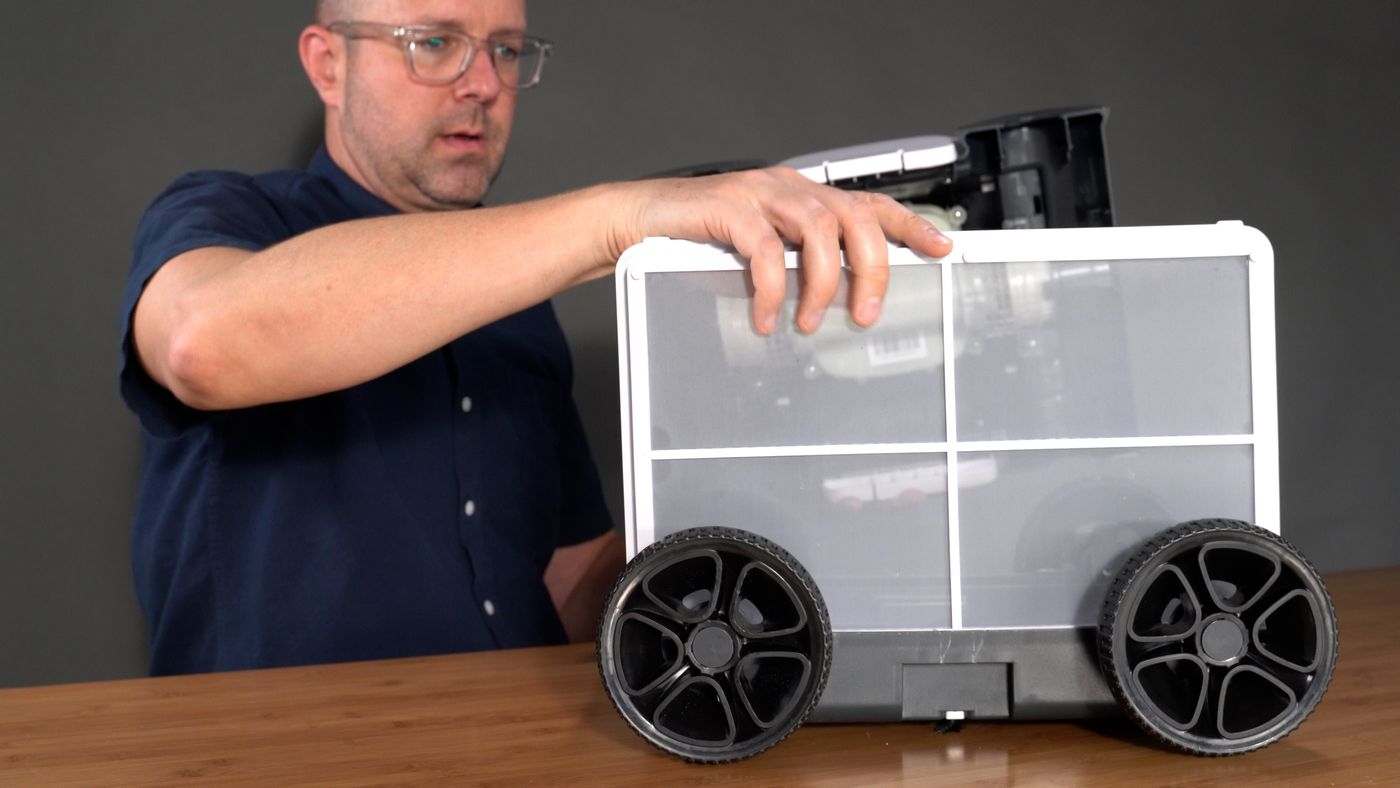
- Rinse the tray every time. Unclip the top body, lift the tray out and wash the tray and chassis. A blocked tray slows it down and wastes charge.
- Watch the blue light. Fast blue flashing is the low-battery signal. Note how many minutes into the run it starts so you have a number to give Aiper.
- Store at part charge. For long storage, keep it cool and top it up every three months to around half.
Stop and call support if: runtime is a fraction of 90 minutes from a full charge with a clean tray and you are inside the 12-month warranty.
Seagull 1000 Stops Mid-Cycle
- Sitting still with a steady blue light
- Stopped with the blue light flashing fast
- Stopped away from the wall
- Cycle finished
- Low battery
- Something jammed against it
- Drive fault
- Read the light. Three blue flashes followed by a steady light and a stop about two minutes later is a completed cycle. Fast flashing is a low battery.
- Check for a jam. If the light is flashing slowly, which means it thinks it is running, but it is not moving, look for something wedged against or under it.
- Run it with the pump off. Aiper says not to run the cleaner while the pool filter is running.
Stop and call support if: the blue light flashes slowly as if running, nothing is jammed, and the robot still does not move.
Seagull 1000 Not Moving or Won’t Reverse
- Light flashing slowly but the robot is still
- Reaches the wall and stays there
- Swing plate missing or jammed
- Debris stuck in or against the robot
- Clogged filter tray
- Drive unit fault
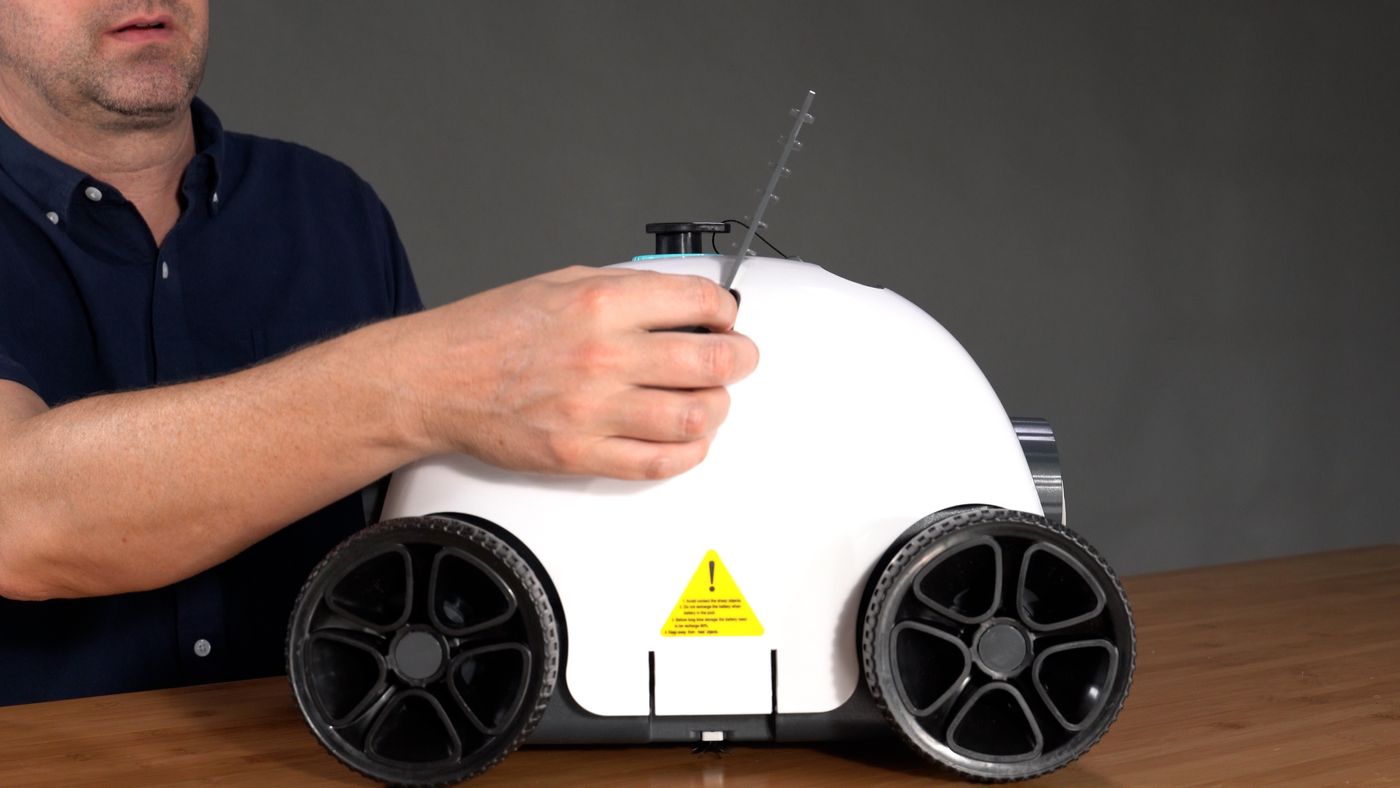
- Check the swing plate. The swing plate plugs into its base on top of the robot and has to move freely. Refit it if it has come out; to remove it for cleaning, push the base buckle upward.
- Clear anything stuck. Aiper's first check when the light flashes but nothing moves is for objects jammed in the robot. Look at both nozzles, the underside and the wheels.
- Wash the filter tray. With the water path blocked there is no thrust. Open it up and rinse the tray and chassis.
- Spin the wheels. Each of the four wheels should turn freely by hand.
Stop and call support if: nothing is jammed and it still will not run. Aiper replaces the drive unit or robot.
Seagull 1000 Misses Spots
- Runs the same line back and forth
- Leaves one side or the corners untouched
- Walls untouched
- Nozzle angles do not suit the pool
- Pool pump running
- Pool larger than 1,076 sq ft
- Floor only; no navigation
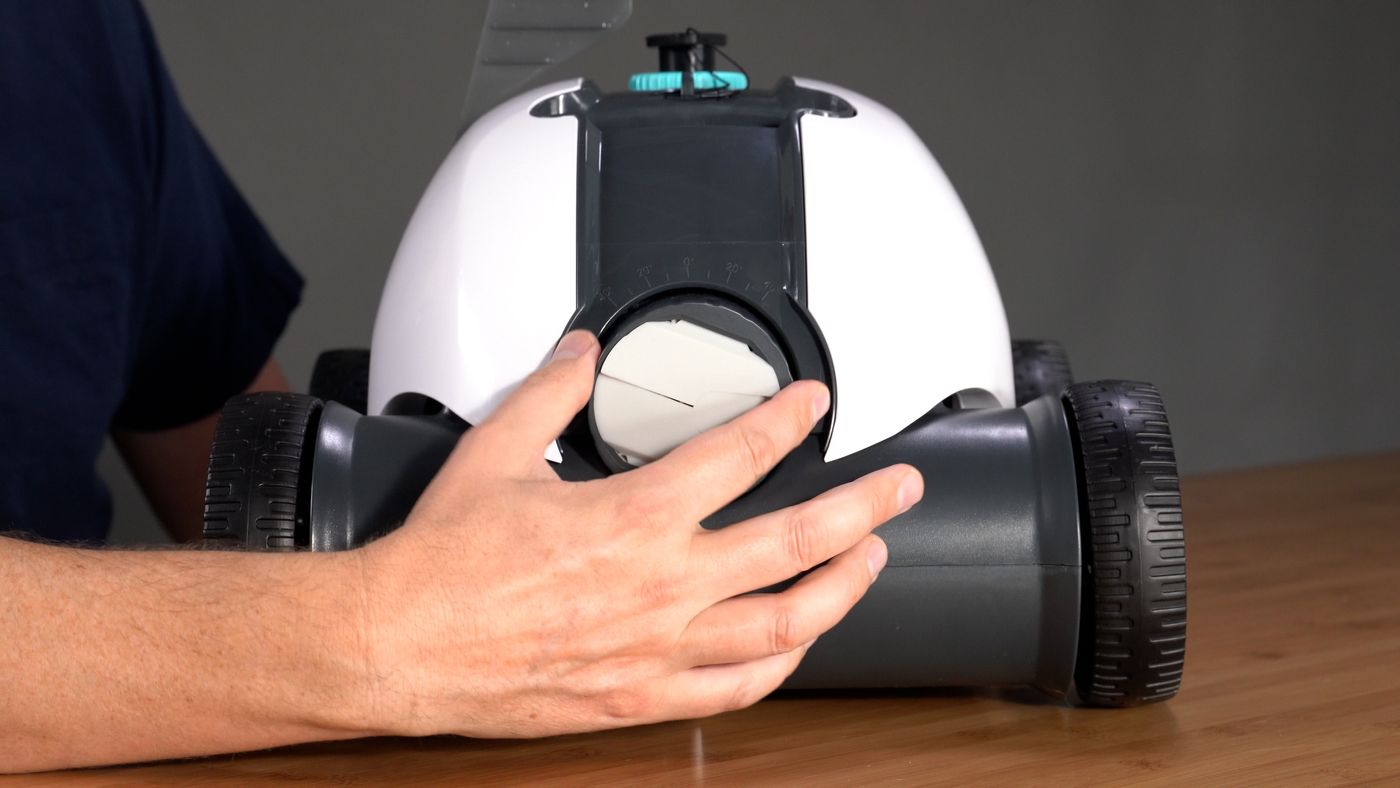
- Understand the nozzles. There is a nozzle at each end marked from 0 to 40 degrees. At 0 the robot travels in a near-straight line; the bigger the angle, the more it curves.
- Try Aiper's three settings. The default is 0 on one nozzle and 20 on the other, which suits most pools. If it is not covering the floor, try 0 and 40. For a round pool, set both to 20.
- Turn off the circulation. Moving water pushes a jet-driven cleaner off course.
- Change the start point. Drop it in at a different spot each run and brush wall dirt down to the floor first.
Stop and call support if: not a support issue unless it has also stopped reversing.
Seagull 1000 Not Picking Up Debris
- Passes over leaves
- Slower and weaker than when new
- Dirt drops out when lifted
- Clogged filter tray
- Brush not installed
- Pool too dirty
- Top body not clipped down
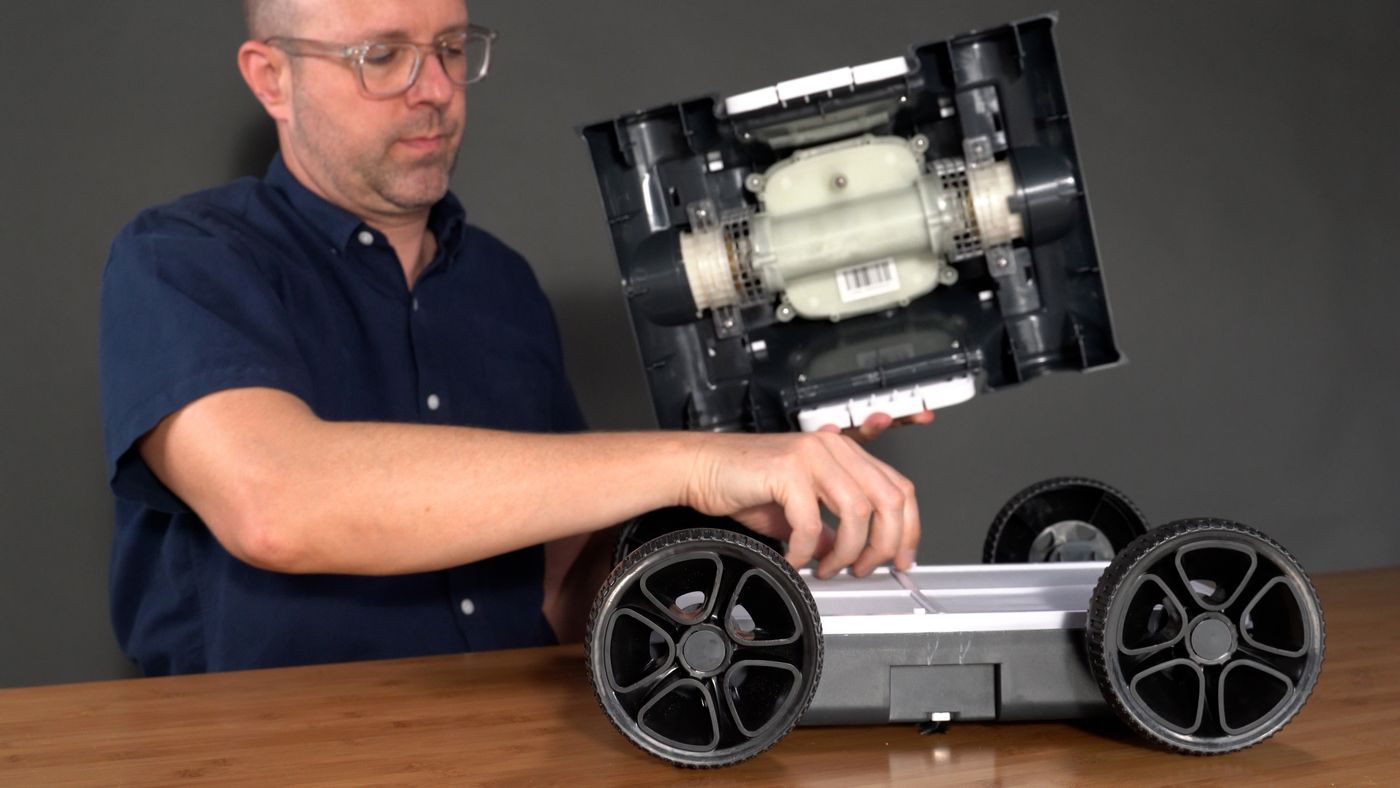
- Wash the tray and chassis. Open the clips, lift off the top body, take out the tray and rinse everything. This is Aiper's fix for a 1000 that has slowed down and lost suction.
- Fit the brush. The brush presses into the underside. Aiper says to install it before use to stop dirt leaking back out.
- Clean a dirty pool by hand first. If the pool is heavily soiled, net and vacuum it manually, then use the 1000 for maintenance.
- Close every clip. After cleaning, seat the top body squarely and push all the clips home.
Stop and call support if: suction stays weak with a clean tray and full battery.
Seagull 1000 Gets Stuck
- Stops on a liner wrinkle
- Stalls where the floor starts to slope
- Pinned in a corner
- Floor not flat (limit is a 15 degree slope)
- Wrinkles or raised fittings
- Drain suction
- Check the floor. The 1000 is built for flat floors and Aiper lists 15 degrees as the most slope it handles.
- Run with the pump off. That removes drain suction and return-jet push from the picture.
- Adjust the nozzle angle. If it keeps driving into the same corner, change one nozzle by 20 degrees so its line shifts.
- Clear the floor. Remove toys, ladders and anything else it can wedge against.
Stop and call support if: it stalls on open, flat floor.
Seagull 1000 Hard to Retrieve
- Floating handle is under water or out of reach
- Scrapes the wall coming out
- Tow rope not set to pool depth
- Floating handle not installed
- Set the tow rope length. Tie the rope at the marked point and adjust it to your water depth so the floating handle sits where you can hook it.
- Pull it up by the handle. Catch the floating handle with a pole and draw the robot to the edge.
- Keep the underside toward the wall. Lift it out with the bottom facing the pool wall to avoid scratching either one.
- Switch off and clean. Turn the knob to OFF so the blue light goes out, then wash the filter tray.
Stop and call support if: not a support issue.
Seagull 1000 Corroded Charging Pins
- Discoloured or pitted charging pins
- Charging has become intermittent
- Charging while the port is wet
- Protective cap left open in the pool
- Stop charging. Do not keep plugging the charger into corroded pins.
- Dry and cap the port every time. Wipe the pins dry after each use, wait a few minutes, charge, then close the protective cap before the next swim.
- Contact Aiper. Aiper's remedy for pins corroded by electrolysis is a replacement drive unit.
Stop and call support if: you can see corrosion on the pins.
Seagull 1000 Lights and What They Mean
These are the indicator states listed in the official Aiper material for the Aiper Seagull 1000. If what you see is not here, check the manual for your exact production run before acting on it.
Nothing to do. It begins moving about 15 seconds later.
Nothing to do.
Take it out, turn the knob to OFF, dry the charging pins and recharge.
Retrieve it by the floating handle and turn the knob to OFF.
Leave it connected; a full charge takes 5 to 6 hours. The robot itself shows no light while charging.
If it is green the moment you plug in a flat robot, reseat the plug in the charging port and check the pins.
What We Saw Testing the Seagull 1000
We ran the Aiper Seagull 1000 in our own test pool for our Aiper Seagull 1000 review. These are the things we ran into ourselves, so you can tell a quirk of the model from a real fault.
- Too fast to pick up: It crosses the pool quickly and left a lot behind, leaves especially.
- Slippery wheels: The hard plastic wheels gave little traction on the pool floor.
- Long charge for a short clean: Out of the box it needed about six hours on the charger for a 90-minute run.
- Nozzle adjustment: We changed the nozzle angles as instructed and did not see a meaningful change in coverage.
- Static brush: The brush on the underside does not spin. It is simply dragged along.
- Flat floors only: All it could do for us was shuttle back and forth on a completely flat surface.
- Liner wrinkles: Even a pool that is slightly out of level or has a wrinkle in the vinyl floor can give it trouble.
- Filter access: Getting to the filter means taking the whole top body off.
When to Call Aiper Support
Stop troubleshooting and get the Seagull 1000 looked at if any of these are true:
- The same fault comes back right after a full clean and a restart
- You see water inside a sealed compartment, or the robot has become noticeably heavier
- There is a burning smell, a melted connector, or visible corrosion on the electrical contacts
- The battery will not take a charge, or the runtime has dropped to a fraction of what it was
- A motor is silent or grinding with nothing blocking it
Before you call, write down the serial number, find your proof of purchase, and record a 20 to 30 second video of the problem. A clip of the robot failing, plus a clear shot of any light on the robot or charger, gets a warranty claim moving faster than any description.
- Support: Aiper support
- Phone: +1 866 850 0666 (Mon-Fri, 9 AM-6 PM ET)
- Email: service@aiper.com
- Manual: Aiper Seagull 1000 user manual
- Warranty: 12 months, battery and motor only
The Seagull 1000 is discontinued. Original warranty was 12 months on battery and motor only, and Aiper's support blog says spare parts are no longer available for it. If yours is still inside warranty, start at aiper.com/us/process-a-warranty with your order number or receipt.
Aiper Seagull 1000 Troubleshooting FAQ
What does the blue light on the Aiper Seagull 1000 mean?
Steady blue is a normal start-up, slow flashing is normal running and fast flashing is a low battery. Three flashes followed by a steady light means the cycle has finished.
How long does the Aiper Seagull 1000 take to charge?
Aiper rates it at 5 to 6 hours for a 90-minute run. The charger shows red while charging and green when done; the robot itself shows no light on charge.
Why is my Aiper Seagull 1000 charger light green when the robot is dead?
The charger shows green whenever it has mains power but is not actually connected to the robot. Turn the knob to OFF, dry the pins and reseat the plug until the light turns red.
How do I adjust the nozzles on the Aiper Seagull 1000?
Turn each nozzle against its 0 to 40 degree scale. Aiper's default is 0 and 20; use 0 and 40 if the floor is not being covered, and 20 and 20 for round pools.
Is the Aiper Seagull 1000 still supported?
It is discontinued. Aiper's support blog states that no spare parts are available for the Seagull 1000, so a failed battery or drive unit outside warranty usually means replacing the robot.
Can the Aiper Seagull 1000 climb walls?
No. It is a floor-only cleaner for flat-bottomed pools.
Still stuck after every check?
Go back to our review for how the Seagull 1000 is supposed to behave, or contact Aiper with your serial number and a short video of the problem.