

The short answer
Most Beatbot AquaSense 2 problems trace back to three things: a filter sealed with fine debris, a battery that is not fully charged, or air trapped in the body. Rinse the filter until the water runs clear, charge until the light shows full, and let the air out before the next run.
This is the troubleshooting home for the Beatbot AquaSense 2. It is a cordless, battery-powered robot that cleans the floor, walls and waterline. Below are the 12 problems owners run into most, each with the checks we would make first and the point where it stops being a do-it-yourself fix.
Safety first: take the AquaSense 2 out of the water and switch it off before you open the filter, touch the brushes, or reach near the impeller. Never charge it while it is wet at the charging contacts, and never open the sealed battery or motor housing.
AquaSense 2 Quick Checks First
Run through these before you chase a specific symptom. Between them they clear up most of what goes wrong with a Beatbot AquaSense 2.
- Charge it all the way. Leave the AquaSense 2 on charge until the light shows full, not just until it turns on. A partial charge causes short runs, weak climbing, and robots that stop in the middle of the pool.
- Rinse the filter until the water runs clear. A filter that looks clean can still be sealed with fine dust. Most pickup, climbing, and early-shutoff complaints end here.
- Let the air out. Hold the robot under the surface and rock it until the bubbles stop before you let go. Trapped air makes it float, tip, and lose grip.
- Rinse it and seat it squarely on the charger. Rinse the AquaSense 2 with fresh water after every run, dry the charging area, and make sure it sits fully in place on the charger. A robot that is a little off will look docked and never fill.
- Check the water. Algae, very cold water, and chemistry far out of range all make a robot slip. Fix the water before you blame the machine.
Beatbot AquaSense 2 at a glance
- Type
- Cordless, battery powered
- Cleans
- Floor, walls and waterline
- Filter
- One top-loading filter basket, single-layer 150-micron mesh, about 2 L
- Battery
- 10,000 mAh. The manual rates run time at 4 hours and charging at about 4 hours at 77 F. It charges only on the included charge…
- App
- Beatbot app over Wi-Fi and Bluetooth
- Built for
- In-ground and above-ground pools
- Weight
- About 24 lb per our review
- Warranty
- 3 years
AquaSense 2 Won’t Charge or Won’t Turn On
- No breathing light when the robot is on the dock
- Light stays orange or yellow after hours on the dock
- Nothing happens when you press Power
- Robot not seated squarely on the charge dock
- Wet, dirty or corroded charging contacts
- Dock unplugged or dead outlet
- Faulty charge dock
- Battery fully drained after it shut itself off in the pool

- Check the outlet and the dock. Plug something else into the outlet to prove it works. Make sure the dock's bracket is clicked into the back of the dock and the power cord is fully in.
- Reseat the robot. Lift the AquaSense 2 off and set it back on the dock squarely. The panel indicator should start a slow breathing pulse within a few seconds. A dead-flat robot can take a moment before the light appears.
- Dry and clean the contacts. Unplug the dock first. Wipe the metal charging contacts on the dock and on the robot with a dry towel and remove any dirt or rust-colored film. If the robot came out of the pool mid-cycle, hold Floor Mode for 3 seconds to drain it for about 3 minutes, then dry the contacts before docking.
- Restart the robot. If the light color does not match the battery level, hold Power for about 3 seconds to shut it off, short-press Power to turn it on, and dock it again.
- Test the dock with a multimeter. Set a multimeter to DC volts and touch the probes to the dock's two metal contacts. Beatbot's guide says a reading above 25.6 V means the dock is fine and the robot is the problem; below 25.6 V points to a bad dock.
- Mind the temperature. The manual limits charging to 32 to 104 F. Move the dock into the shade or indoors, out of direct sun and away from moisture, and try again.
Stop and call support if: the dock reads above 25.6 V and the robot still shows no breathing light, or the dock reads low. Beatbot replaces a faulty dock or robot under the 3-year warranty.
AquaSense 2 Floats and Takes Forever to Sink
- Robot bobs on the surface after you put it in
- Pump noise but no movement for the first few minutes
- Normal start-up: it has to push the air out of its buoyancy chamber
- Robot was not powered on or no mode was selected
- Battery too low to start
- Give it three minutes. The AquaSense 2 releases air from its buoyancy chamber before it sinks, and Beatbot says to allow about 3 minutes. The humming you hear before and after a cycle is the same pump and is normal.
- Confirm it is on and a mode is lit. Before it goes in, short-press Power and press Floor Mode or Standard Mode. The chosen mode button should glow solid white and the panel indicator should be green.
- Let it calibrate on the deck. Set the robot on a level surface for about 5 seconds before lowering it in. Beatbot says this calibration step is what the cleaning path is built on.
- Lower it in by the handle. Place it in the water rather than throwing it, and leave it alone while it vents. Do not push it under by hand.
Stop and call support if: it is still on the surface well past the 3-minute start-up with a green light and a mode selected.
AquaSense 2 Sits on the Floor or Moves Slowly
- Robot stopped on the pool floor
- Crawls far slower than usual
- App shows a roller brush or track warning after you pull it out
- Filter basket packed with debris
- Stuck on a drain or another obstacle
- Circulation pump pulling it toward a drain or return
- Hair or string wrapped around the roller brushes or tracks
- Battery ran out
- Turn the pool pump off. Beatbot recommends running the robot with the circulation system off. Suction at a main drain can hold the robot in place.
- Free it with the hook. If it has been stuck for several minutes, clip the supplied hook to your pool pole, catch the handle and move the robot clear. It carries on cleaning once it is free.
- Empty the basket. Lift it out, press the push-to-open switch, raise the cover and pull the basket. A very dirty pool fills the 2 L basket quickly and the robot slows down as it clogs.
- Clear the brushes and tracks. Power off, turn the robot over on a towel and pull hair, string and leaves out of the roller brushes, both tracks and the water outlet. If the app reported a roller brush or track problem, this is what it is asking for.
- Recharge and retest. Dock it until the light is solid green, then run one cycle while you watch.
Stop and call support if: one track or the brushes do not turn at all with nothing wrapped around them, or the app keeps reporting a brush or track fault on a clean robot.
AquaSense 2 Won’t Climb Walls
- Stays on the floor for the whole cycle
- Starts up the wall and slides back
- Never reaches the waterline
- Floor Mode selected instead of Standard Mode
- Clogged filter basket (Beatbot's most common cause)
- Debris in the roller brushes or tracks
- Water chemistry outside the manual's range
- Check the mode. Floor Mode only cleans the floor. Press Standard Mode so that button is lit white; it runs floor, then walls, then waterline.
- Clean the filter basket. Beatbot names debris in the basket as the main reason the AquaSense 2 stops climbing. Open the top cover, pull the basket, empty it and rinse the mesh from the outside in with a hose.
- Clean the brushes and tracks. With the robot off, remove hair and grit from the roller brushes and the tracks so they can grip the wall.
- Check the water. The manual calls for chlorine at 4 ppm or less, pH 7.0 to 7.8 and water between 43 and 95 F. Slick algae on the walls also costs traction, so brush it off first.
- Send Beatbot a log. If it still will not climb with a clean basket, use the Beatbot app to upload a device log, then contact support with the serial number.
Stop and call support if: it will not climb in Standard Mode with a clean basket, clean tracks and balanced water.
AquaSense 2 Not Picking Up Debris or Fine Sand
- Dirt or sand still on the floor after a cycle
- Basket comes out nearly empty
- Cloud of fine dust behind the robot
- Particles smaller than the 150-micron mesh pass straight through
- Basket clogged so water cannot flow
- Hair or sand packed in the roller brushes or water outlet
- Battery running down late in the cycle
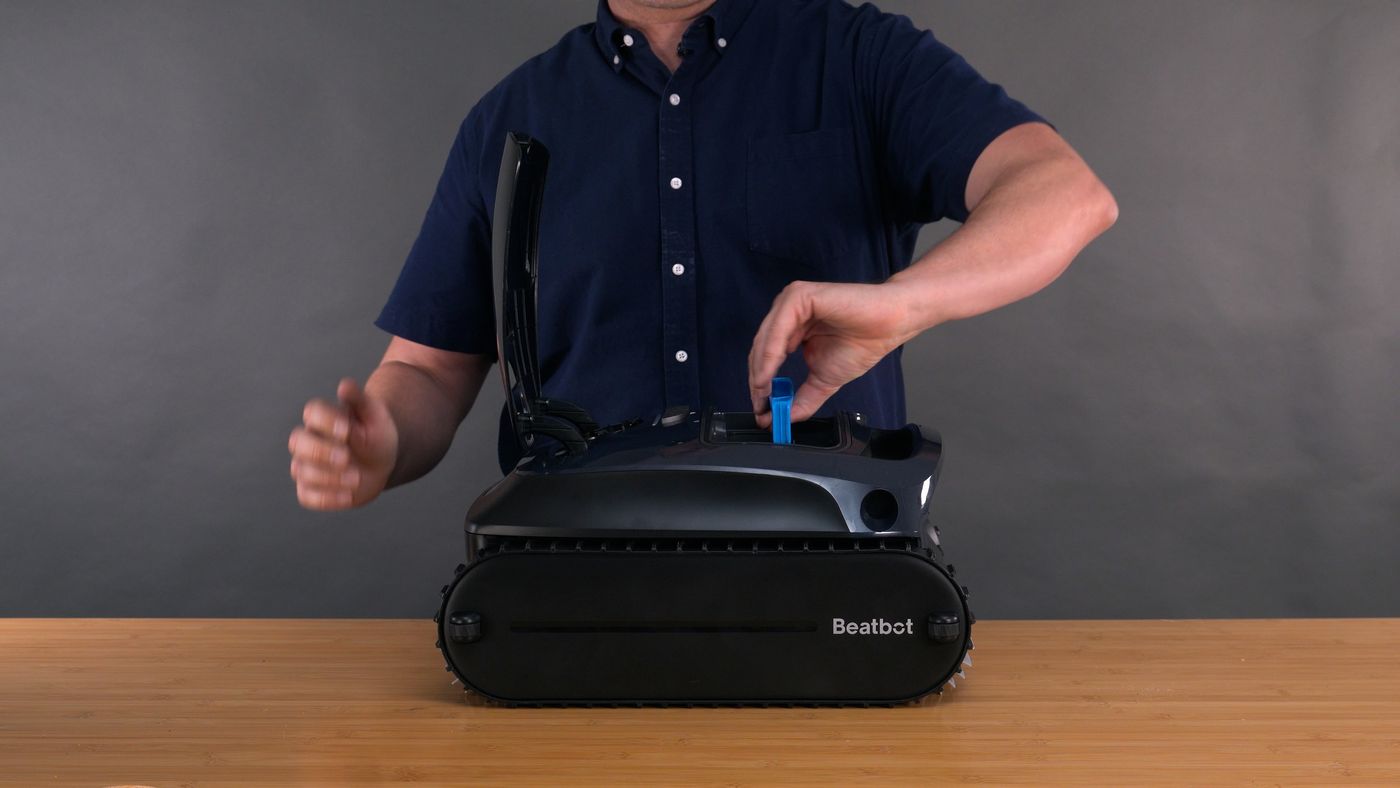
- Know the limit of the mesh. The standard basket stops debris down to 150 microns. Finer sand and silt go through the mesh and out the water outlet, which matches what we saw in our own pool.
- Rinse the basket every cycle. Open the cover, pull the basket, dump it and hose the mesh clean. A film of fine dirt on the mesh cuts suction even when the basket looks empty.
- Clear the outlet and brushes. The manual says to check the water outlet on top and the roller brushes after each use and remove tangled hair and trapped sand.
- Run with the pump off. Shut off the circulation pump while the robot works so return jets are not stirring debris back up.
- Ask Beatbot about the fine basket. Beatbot's support page says an optional fine filter basket rated to 60 microns exists for this model and that you can request one through support.
Stop and call support if: there is no water flow from the top outlet with a clean basket, which points at the pump rather than the filter.
AquaSense 2 Debris Falls Back Into the Pool
- Leaves and dirt wash out as you lift the robot
- Dirty streak in the water where you pulled it out
- Water draining back out through the intake as the robot is lifted
- Overfilled basket
- Basket or cover not seated

- Empty it after every run. Do not let the 2 L basket fill to the top. The fuller it is, the more comes back out when the robot drains.
- Seat the basket and cover. Push the basket down until it sits flat and press the cover until the push-to-open latch catches. If the app says the filter basket is not installed, the basket's magnet is not sitting where the robot can sense it.
- Lift it level at the waterline. Grab the handle while the robot is parked at the wall and bring it up level. In our testing, lifting slowly, tilting and draining longer did not fully stop the spill, so plan to net what escapes.
- Check the basket for damage. Look for a torn mesh panel or a warped frame that leaves a gap. Filter baskets are a replaceable part.
Stop and call support if: the basket is cracked or will not seat. Beatbot covers filter baskets for 3 months.
AquaSense 2 Misses Spots or Wanders Randomly
- Corners and steps left dirty
- No clear back-and-forth pattern
- Cleans the same area twice
- Rounded or irregular pool floor makes path planning fail
- MultiZone Mode uses a random path by design
- Robot was not calibrated on level ground before the cycle
- Dirty ultrasonic sensors
- Toys or towels in the pool
- Calibrate before every cycle. Set the robot on a flat part of the deck for about 5 seconds after you choose the mode. Skipping this is the easiest way to get a crooked path.
- Wipe the sensors. Clean the two ultrasonic sensors on the front with a soft cloth and make sure nothing is stuck over them.
- Use Floor x2 in the app. Beatbot says a bowl-shaped floor, or choosing MultiZone Mode, drops the robot into a random pattern. For straight S-shaped lanes, pick Custom Mode and Floor x2 in the Beatbot app, which runs two crossing passes over the floor.
- Clear the pool. Take out toys, towels and floats before starting so the robot does not route around them.
- Brush the corners toward the middle. Corners and steps were the weak spot in our testing. A quick brush toward open floor before the cycle gives the robot a chance to pick that debris up.
Stop and call support if: the robot spins in place or runs one track only, which is a drive fault rather than a navigation quirk.
AquaSense 2 Stuck on the Main Drain
- Stops on the same drain cover every cycle
- Tracks turn but the robot does not move
- Circulation pump suction holding it on the drain
- Raised drain cover lifting the tracks off the floor
- Run it with the pump off. Suction through the main drain can pin the robot. Turn the circulation pump off for the cleaning cycle.
- Free it with the hook. Use the supplied hook on a pool pole to slide the robot off the cover. Do not get in the pool while it is running.
- Fit a drain cover clip. Beatbot's fix for a protruding cover is a correctly sized drain cover clip, which gives the tracks and brush something to grip. Never remove, flatten or modify an anti-entrapment drain cover.
- Check the app afterwards. A roller brush or track warning in the app after a stall means the brush motor was overloaded while it was stuck. Clear anything wrapped around the brush before the next run.
Stop and call support if: it stalls on open floor away from any drain, or the drain cover itself is loose or cracked (call a pool professional for the cover).
AquaSense 2 Doesn’t Come Back to the Surface
- Cycle is over and the robot is on the floor
- It reached the wall but the handle is still under water
- It was at the waterline earlier and has sunk again
- Clogged filter basket (most common)
- Debris wrapped in the roller brush or tracks
- Pool coping too close to the waterline
- Battery died before or after it parked
- Hook it out. Thread the supplied hook onto a pool pole, catch the handle and bring the robot to the surface before lifting by hand. It weighs about 24 lb dry and more full of water, so lift with your legs.
- Clean the basket. Beatbot lists a clogged basket as the top reason the AquaSense 2 cannot climb back to the waterline. Empty and rinse it before the next cycle.
- Look for an entanglement alert. Once it is out of the water the app reconnects. If it reports something tangled in the roller brush or tracks, clear it.
- Check the gap under the coping. If the coping overhangs close to the water, the handle cannot rise clear. Beatbot says to lower the water until there is at least 7 inches (18 cm) between the coping edge and the waterline.
- Collect it promptly. In our testing the robot sank again when the battery ran out at the surface. Set a phone timer for the end of the cycle so you are there while it is still parked.
Stop and call support if: it never returns to the waterline with a clean basket and enough clearance. Upload a log in the app and give support the serial number.
AquaSense 2 Battery Runs Out Early
- Cycle ends well short of the rated 4 hours
- Robot found dead on the floor
- Light drops to orange quickly
- Clogged basket making the robot retry wall climbs
- Robot getting stuck and overloading a motor
- Very dirty pool
- Partial charge
- Cold weather slowing the charge
- Start with a clean basket. Beatbot explains that a full basket reduces climbing power, so the robot keeps attempting the wall and burns through the battery. Rinse the basket before each run.
- Charge to solid green. Leave it on the dock until the breathing light stops and the indicator is solid green, about 4 hours. Charging takes longer below 77 F.
- Remove what traps it. Stalls on a drain or tangled brushes drain the pack fast. Fix those first using the stuck and not-moving steps.
- Use Floor Mode for a quick clean. When only the floor needs attention, Floor Mode skips the walls and waterline, which are the most power-hungry part of a cycle.
- Store it half charged. For the off-season the manual says to power it off, store it indoors and top the battery up to about 50% at least every 6 months.
Stop and call support if: run time stays far below the rating on a full charge with a clean basket. The battery is covered under the 3-year main-body warranty.
AquaSense 2 App Won’t Connect or Shows Offline
- Pairing fails in the Beatbot app
- Robot shows offline
- No verification code email
- Robot is under water (Wi-Fi does not pass through water)
- Robot not in setup mode
- Wrong Wi-Fi band or password
- VPN running on the phone
- Robot bound to another account
- Router restarted or its name or password changed
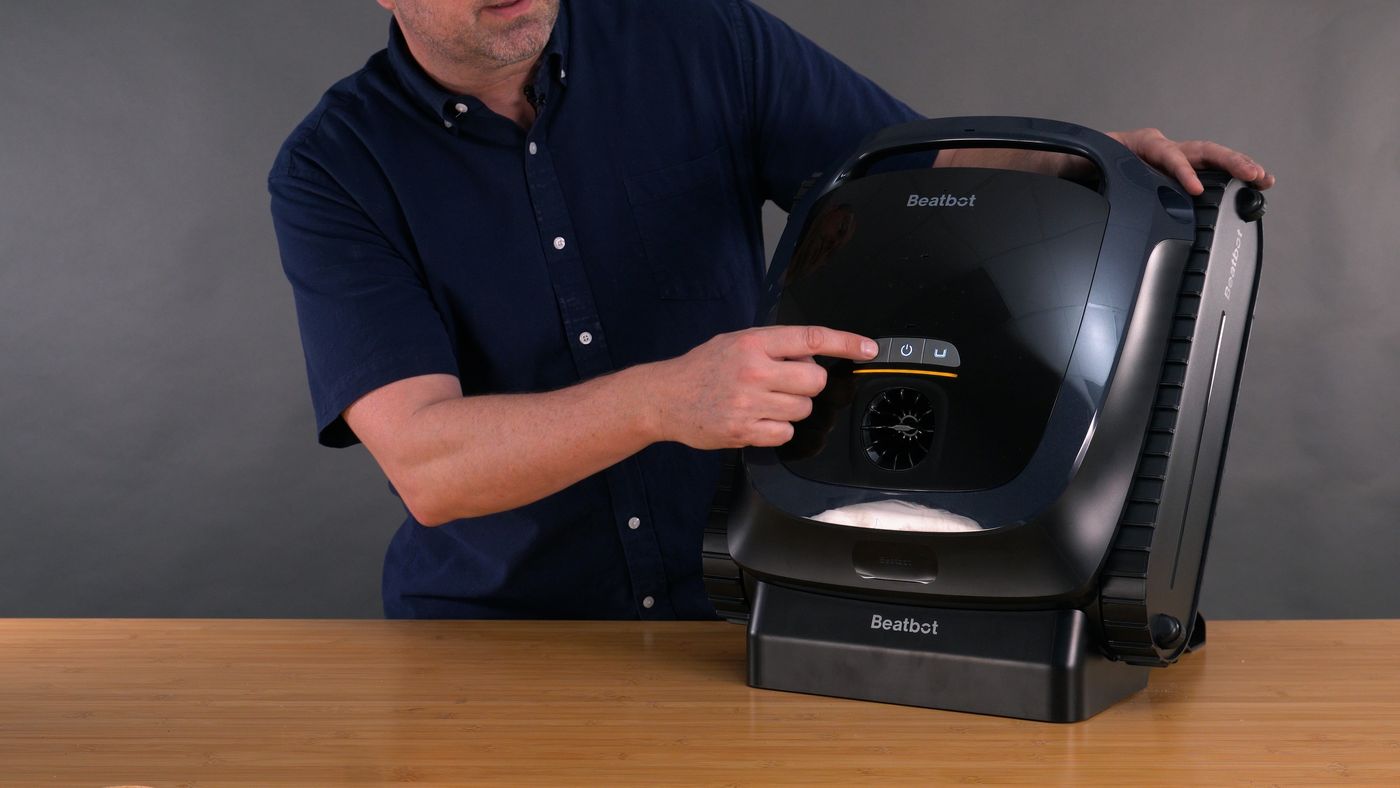
- Take it out of the water. Offline during a cycle is normal. The link returns when the robot is at the surface or on the deck, and the app then syncs the cleaning record.
- Put it in setup mode. With the robot on and within about 3 feet of your phone, hold Power and Floor Mode together for about 3 seconds until the indicator flashes blue.
- Check the network. Join your phone to the 2.4 GHz band for setup, confirm the Wi-Fi password, and turn off any VPN. In setup mode a network whose name starts with Beatbot should appear in your phone's Wi-Fi list.
- Try another add method. In the app use Add Device with Bluetooth switched on, or Scan to Add and point the camera at the QR code on the robot, or add the model manually.
- Reset the Wi-Fi if it was paired before. If the robot is tied to another account or the router changed, repeat setup mode and pair again. A full factory reset is Floor Mode, Power and Standard Mode held together for about 10 seconds.
- Find the verification email. If the code never arrives, check spam and promotions folders and any forwarding or auto-delete rules. Work and school mailboxes sometimes block these messages.
Stop and call support if: the indicator will not flash blue, or no Beatbot network ever appears in setup mode. Beatbot treats that as a replacement case.
AquaSense 2 Water Draining Out on the Dock
- Water runs out of the robot after you set it on the dock
- Pump noise on the dock for a few minutes
- Cycle was interrupted before the robot surfaced, leaving water in the buoyancy chamber
- Robot lost power before it finished draining
- Know what is normal. The AquaSense 2 pumps water out of its buoyancy chamber after a cycle. If it never got to finish, it does so when it is next powered, including on the dock. It takes about 3 minutes.
- Drain it at the pool instead. Set the robot on the deck and hold Floor Mode for 3 seconds. Wait about 3 minutes until the pump stops and the dripping ends.
- Dry the contacts. Wipe the charging contacts on the robot with a towel before it goes back on the dock.
- Do not power off mid-drain. If power is cut during draining, it starts over the next time the robot is switched on. Let it finish first.
- Drain before storage. Run the manual drain before putting the robot away for more than a few days so water does not sit inside.
Stop and call support if: water keeps coming out long after a completed drain, or you see water behind the panel indicator or inside a sealed housing.
AquaSense 2 Lights and What They Mean
These are the indicator states listed in the official Beatbot material for the Beatbot AquaSense 2. If what you see is not here, check the manual for your exact production run before acting on it.
Nothing to fix. Pick a mode and put it in the pool.
Put the robot on the charge dock before starting a full cycle.
Charge it now. A cycle started at this level will end early.
Lift it out, hold Power for about 3 seconds to shut it off, then check the Beatbot app for the alert. Clear the filter basket, roller brushes and tracks before restarting.
Finish pairing in the app, or leave the robot alone on the dock until the update completes.
Leave it on the dock until the light is solid green.
Confirm the right button is lit before the robot goes in the water. Floor Mode will not climb walls.
What We Saw Testing the AquaSense 2
We ran the Beatbot AquaSense 2 in our own test pool for our Beatbot AquaSense 2 review. These are the things we ran into ourselves, so you can tell a quirk of the model from a real fault.
- Dock is the only way to charge: There is no plug-in port. If the charging stand is lost or broken the robot cannot be charged until it is replaced.
- Corners and steps missed: Navigation looked more like wandering than a planned path, and corners and steps were often left dirty.
- Mesh filter is not fine: The basket uses plain mesh rather than a pleated fine filter, so it does not polish the water.
- No app contact under water: The Wi-Fi link dropped as soon as the robot went under, so we could not check on it during a cycle.
- Debris falls back into the pool: When we lifted the AquaSense 2 out, debris slipped out of the filter compartment and back into the water. Lifting slowly, tilting it and letting it drain longer did not stop it.
- Sinks again after surface parking: The robot floats at the surface when the battery gets low, but when we did not reach it in time the battery died and it sank back to the floor.
- Battery barely covers a cycle: In our pool the battery ran low right around the end of a single cleaning cycle, so every run meant pulling it out and recharging.
- Fine debris left behind: Leaves and small twigs were picked up, but sand, silt and fine dirt were still on the floor after a full cycle.
When to Call Beatbot Support
Stop troubleshooting and get the AquaSense 2 looked at if any of these are true:
- The same fault comes back right after a full clean and a restart
- You see water inside a sealed compartment, or the robot has become noticeably heavier
- There is a burning smell, a melted connector, or visible corrosion on the electrical contacts
- The battery will not take a charge, or the runtime has dropped to a fraction of what it was
- A motor is silent or grinding with nothing blocking it
Before you call, write down the serial number, find your proof of purchase, and record a 20 to 30 second video of the problem. A clip of the robot failing, plus a clear shot of any light on the robot or charger, gets a warranty claim moving faster than any description.
- Support: Beatbot support
- Phone: (833) 702-4399 (9:00 AM to 6:00 PM Central, seven days a week)
- Email: service@beatbot.com
- Manual: Beatbot AquaSense 2 user manual
- Warranty: 3 years
36-month warranty on the main body including the battery and power supply; 3 months on filter baskets and roller brushes. Valid for purchases from Beatbot or an authorized dealer in the US or Canada. Have proof of purchase and the serial number ready; Beatbot may ask you to upload a log or install a firmware update….
Beatbot AquaSense 2 Troubleshooting FAQ
Why does my Beatbot AquaSense 2 float instead of sinking?
It has a buoyancy chamber that it empties of air at the start of every cycle, and Beatbot says to allow about 3 minutes. Make sure the robot is powered on with a mode button lit white before it goes in. If it is still floating well after that with a green light, contact Beatbot.
What does a flashing orange light mean on the Beatbot AquaSense 2?
Flashing orange is the manual's malfunction signal. Take the robot out, switch it off, check the app for the specific alert, and clear the basket, roller brushes and tracks. Solid orange is different: it only means the battery is nearly empty.
Can I charge the Beatbot AquaSense 2 without the dock?
No. The robot has no plug-in port and charges only on the included charge dock. If the dock fails, test it with a multimeter (Beatbot says above 25.6 V is healthy) and contact support for a replacement.
Why does the Beatbot AquaSense 2 app go offline during cleaning?
Wi-Fi does not travel through water, so the robot drops off the network as soon as it submerges. It reconnects at the surface or on the deck and uploads the cleaning data then. You cannot recall or steer this model from the app mid-cycle.
Why won't my Beatbot AquaSense 2 climb the walls?
First check that Standard Mode is selected, because Floor Mode never climbs. Then empty and rinse the filter basket, which Beatbot calls the most common cause, and clear the brushes and tracks. If it still stays on the floor, upload a log in the app and contact support.
How long does the Beatbot AquaSense 2 battery last?
The manual rates it at 4 hours from a 10,000 mAh pack with about 4 hours to recharge. In our testing it ran low right around the end of one full cycle. A clogged basket or repeated stalls will shorten that noticeably.
Still stuck after every check?
Go back to our review for how the AquaSense 2 is supposed to behave, or contact Beatbot with your serial number and a short video of the problem.