
The short answer
Most Winny 200SE problems trace back to three things: a filter sealed with fine debris, a battery that is not fully charged, or air trapped in the body. Rinse the filter until the water runs clear, charge until the light shows full, and let the air out before the next run.
This is the troubleshooting home for the Winny 200SE. It is a cordless, battery-powered robot that cleans the floor only. Below are the 11 problems owners run into most, each with the checks we would make first and the point where it stops being a do-it-yourself fix.
Safety first: take the 200SE out of the water and switch it off before you open the filter, touch the brushes, or reach near the impeller. Never charge it while it is wet at the charging contacts, and never open the sealed battery or motor housing.
200SE Quick Checks First
Run through these before you chase a specific symptom. Between them they clear up most of what goes wrong with a Winny 200SE.
- Charge it all the way. Leave the 200SE on charge until the light shows full, not just until it turns on. A partial charge causes short runs, weak climbing, and robots that stop in the middle of the pool.
- Rinse the filter until the water runs clear. A filter that looks clean can still be sealed with fine dust. Most pickup, climbing, and early-shutoff complaints end here.
- Let the air out. Hold the robot under the surface and rock it until the bubbles stop before you let go. Trapped air makes it float, tip, and lose grip.
- Rinse and dry the charging contacts. Pool water left on the charging port or contacts corrodes them. Rinse with fresh water and dry them before every charge.
- Check the water. Algae, very cold water, and chemistry far out of range all make a robot slip. Fix the water before you blame the machine.
Winny 200SE at a glance
- Type
- Cordless, battery powered
- Cleans
- Floor only
- Filter
- One flat plastic mesh filter tray that sits between the clear top cover and the base
- Battery
- The Osprey 200 SE manual lists a 60-minute working cycle and 3-4 hours to recharge
- App
- No app
- Built for
- Small, flat-bottomed pools, mainly above-ground
- Weight
- 7.27 lb
- Warranty
- 1 year. The Osprey 200 SE manual covers the motor, battery and circuit board for one…
200SE Won’t Turn On
- No beep when you press the button on the underside
- It beeps, then nothing happens in the water
- It beeps continuously on the deck
- Battery is flat
- Robot was left on out of the water for more than 3 minutes
- Battery deep-discharged in storage
- Internal fault
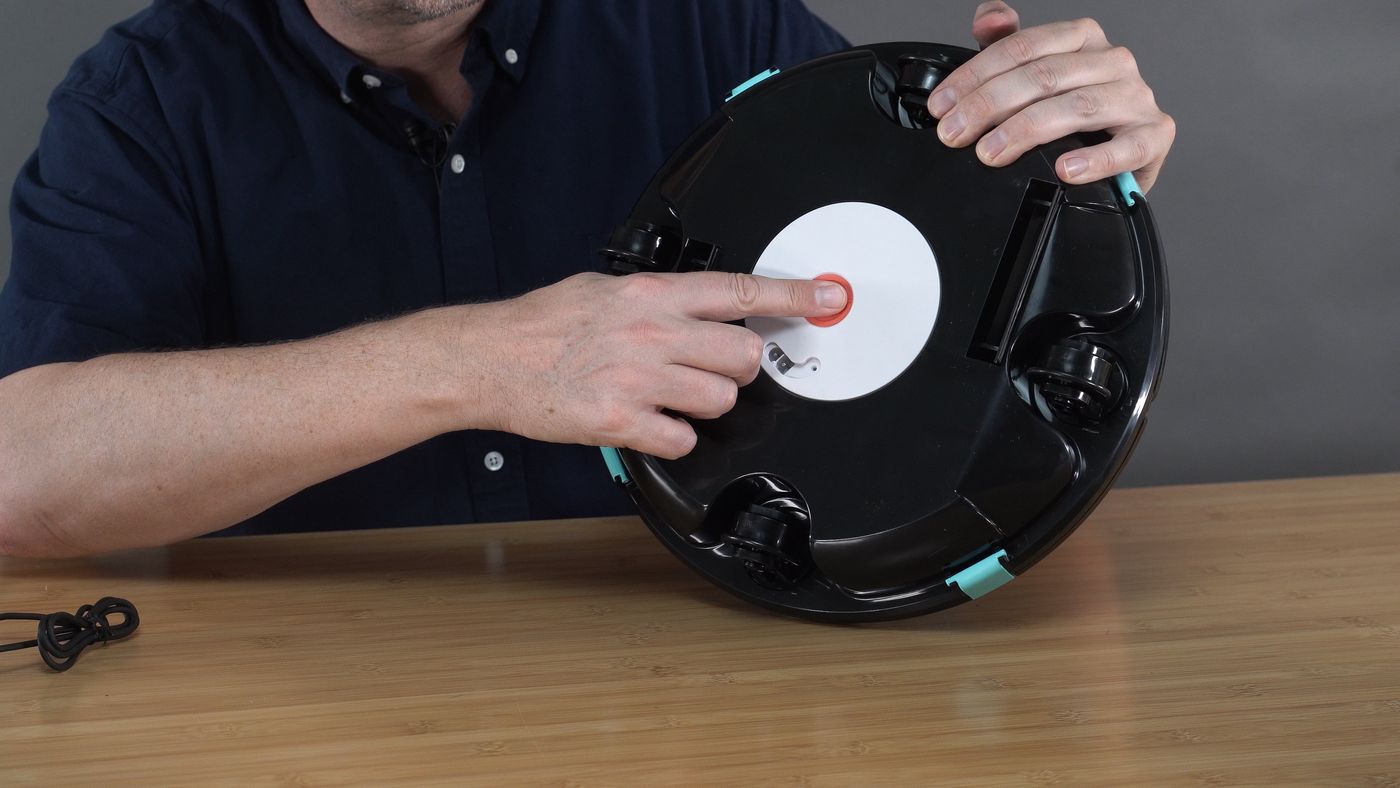
- Find the button. Turn the robot over. The round on/off button sits in the middle of the white disc on the underside, next to the charging port. Press it and listen for the beep.
- Charge it fully first. The sister-model manual lists a low battery as the first cause when the buzzer stays silent or the impeller does not spin. Give it a full 3-4 hour charge before trying again.
- Get it in the water within 3 minutes. According to the Osprey 200 SE manual, the robot must go into the pool within 3 minutes of being switched on. If it sits longer it beeps continuously and has to be switched off and started again.
- Submerge it completely. Hold it by the handle, lower it in on end, and let it fill and settle on the floor. It needs a few seconds on the floor before it moves.
- Consider how long it was stored. These batteries are meant to be topped up every three months. A unit that sat flat for a season may not recover, and the manual says not to open the sealed drive unit yourself.
Stop and call support if: there is no beep after a full charge on a charger whose light works. The manual's answer for that is an internal fault that needs the maker.
200SE Won’t Charge
- Charger light stays off
- Charger light flashes
- Robot is still dead after hours plugged in
- Water or grit in the charging port on the underside
- Robot still switched on
- Plug not fully seated
- Failed charger
- Battery damaged by long storage while flat
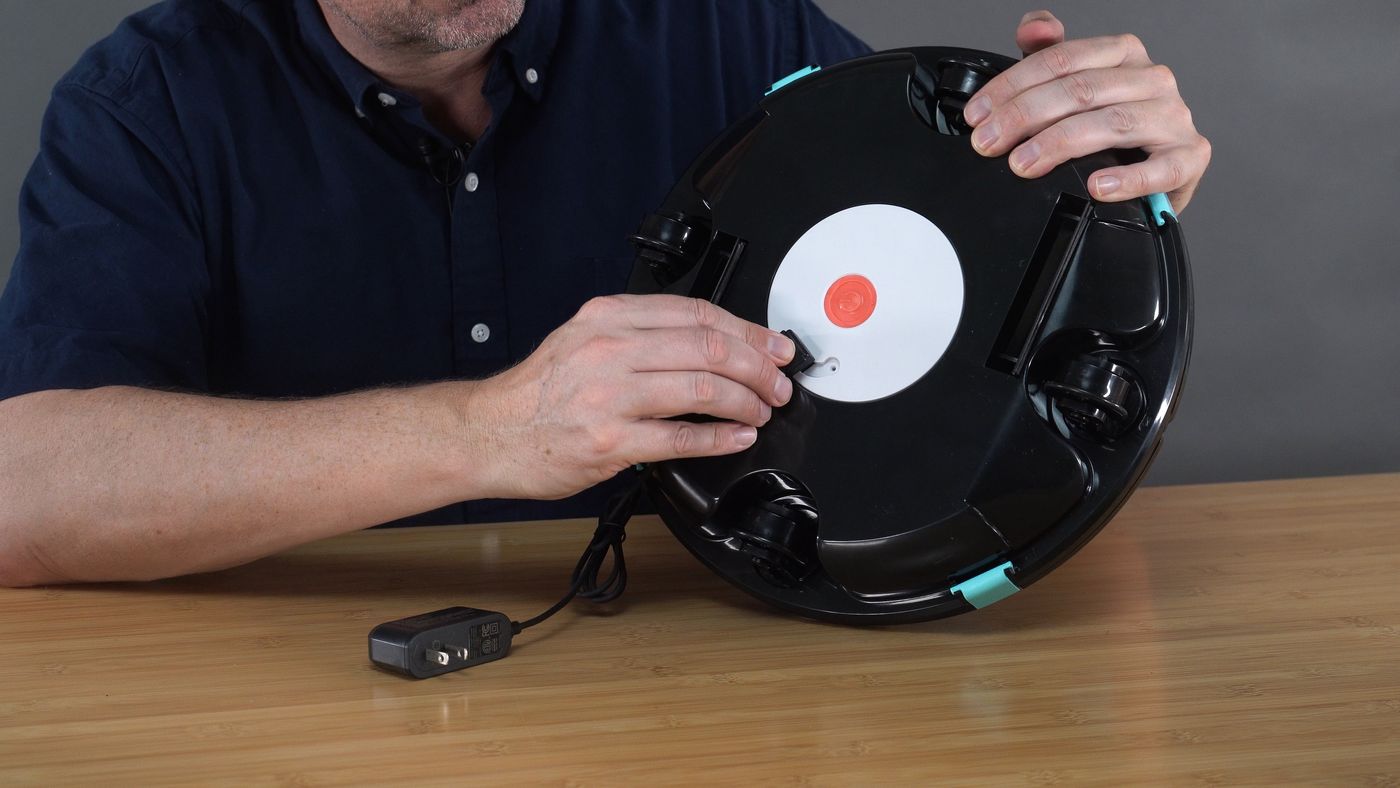
- Switch it off and dry the port. The charging port is on the underside beside the power button, behind a small rubber plug. The manual requires the robot to be off and the port dry before charging. Shake out any water and let it air-dry.
- Seat the plug and set the robot upright. Push the charger connector fully into the port, then stand the robot on its wheels. The Osprey 200 SE manual warns that leaving it resting upside down on the handle can break the flipper.
- Watch the charger. The Osprey 200 SE manual describes a light on the charger that is red while charging and green when the battery is full. We could not confirm this against a manual printed for the 200SE, so treat it as likely, not certain.
- Try another outlet. If the charger shows no light at all, plug it into a different outlet. The same manual says a charger with no light, or one that flashes, is defective and needs replacing.
- Charge in a cool, shaded spot. Keep the robot at least 3 m (about 10 ft) from the pool, out of direct sun, and between 32 and 95 degrees F while it charges. Do not cover it. We stayed nearby every time ours was plugged in.
Stop and call support if: the charger has no light or a flashing light on a good outlet, or the robot gets hot, swells or smells while charging. Unplug it and stop using it.
200SE Short Battery Life
- Stops before the pool is finished
- Runs well under an hour
- Needs several charges to clean one pool
- The design is rated for roughly a 60-minute cycle
- It was not fully charged
- Filter tray clogged
- Heavy debris load
- Battery wear on an older, discontinued unit
- Know the rated run. The matching Wybot manual lists a 60-minute working cycle from a 2600 mAh battery. In our 8x20 pool it often cut off before the floor was done. An hour or a little less is normal for this robot.
- Charge the full 3-4 hours. A short top-up gives a short run. Leave it on the charger for the full charge time before each use.
- Rinse the filter tray every run. Unclip the four rim clips, lift the clear top cover, and take out the mesh tray. Hose both sides. A clogged tray makes the pump work harder for less cleaning.
- Net out heavy debris first. Scoop leaves before you launch it. Ours ran out of battery fastest when the pool had a lot of debris in it.
- Plan on more than one charge. For anything larger than a small above-ground pool, expect to recharge and run it again. There is no eco mode or timer to stretch a charge.
Stop and call support if: a full charge gives only a few minutes of run time. On a discontinued model that usually means the battery is finished.
200SE Stops Mid-Cycle
- Stops against the wall partway through
- Stops dead in the middle of the floor
- Stops on a wrinkle or seam
- Battery low (it parks at a wall when it runs down)
- Stuck on a floor wrinkle or obstacle
- Flipper jammed so it cannot reverse
- Filter tray blocked
- See where it stopped. Stopped against a wall usually means the run is over or the battery is low; the design parks itself at the wall. Stopped in open floor on a wrinkle is a traction problem, not a battery problem.
- Recharge and time the next run. Charge it fully and time how long it runs. If you get close to an hour, the battery is doing what it can.
- Check the flipper. With the robot off, rock the arched handle back and forth. It should tip freely each way. If it binds, rinse out the hinge points on both sides.
- Clean the tray. Open the four clips, lift the cover, and rinse the mesh tray. Reassemble with the cover pins lined up with their holes.
- Turn the pool pump off. The manual says not to run the cleaner while the pool filter is running. Return jets and skimmer pull can pin a light robot in one place.
Stop and call support if: it stops within minutes on a full charge in a flat, clear pool with a clean tray.
200SE Not Moving
- Beeps under water but stays put
- No water flow coming out of the robot
- Sits against a wall and never comes back
- Low battery
- Flipper (swing plate) stuck
- Water channel blocked
- Impeller jammed with debris
- Internal drive fault
- Charge it. The manual's table starts with the battery: a silent buzzer or an impeller that does not turn at power-on means recharge first.
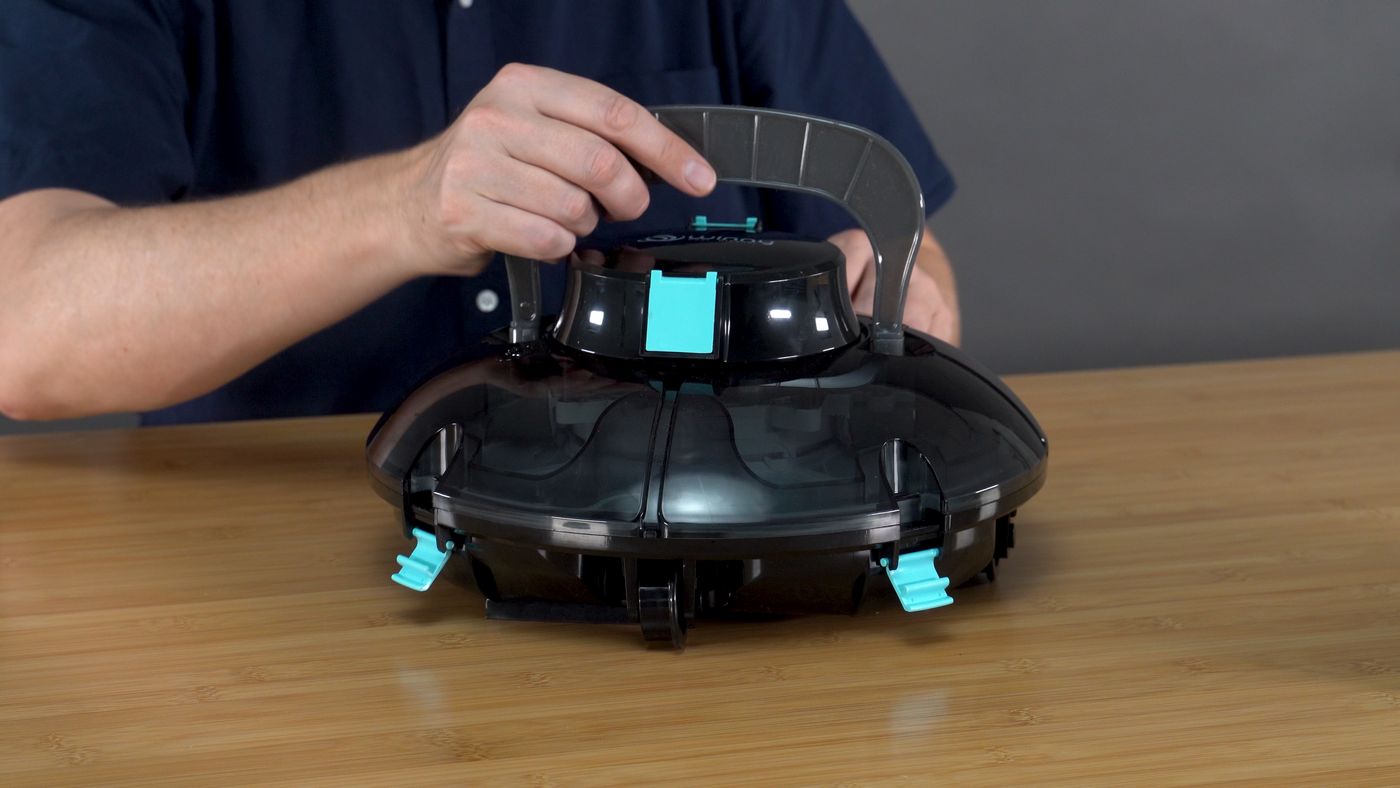
- Free the swing plate by hand. If the buzzer keeps sounding or the impeller will not turn once the robot is fully under water, the manual says the swing plate is stuck. Take the robot out, switch it off, and move the arched handle through its travel by hand until it swings freely.
- Clear the water channel. If the handle tips at the wall but the robot still will not reverse, the manual points to a blocked water channel. Remove the top cover and tray and clear anything lodged in the outlet path under the handle.
- Look at the impeller opening. With the robot off and the tray out, look down the center opening in the base where the pump draws water. Pull out hair, string or leaf stems you can reach with your fingers. Do not open the sealed white drive unit.
- Check the screws on the handle. The flipper is held by one screw from each side. If one has backed out, the handle sits crooked and jams. Snug both, without overtightening into the plastic.
Stop and call support if: the impeller will not turn on a full charge with nothing blocking it, or the robot never reverses even with a free flipper. The manual lists both as drive-unit faults.
200SE Gets Stuck
- Stops on liner wrinkles or seams
- Hangs up on a drain, step or ladder base
- Wedges into a corner
- Very low ground clearance and small wheels
- Scrapers catching on wrinkles
- Floor is not flat
- Flipper not reversing the robot
- Smooth the floor where you can. On a vinyl liner, work out wrinkles with a soft pool brush before the run. Small wrinkles were enough to stop ours.
- Clear the pool. Take out ladders, toys and loose fittings. Winny's manual for the related 200 model says the design only suits pools with a flat floor.
- Try it without the scrapers. The two clip-on scrapers on the underside are optional add-ons meant to improve pickup. If the robot keeps catching on wrinkles, unclip them and test again.
- Check the wheels turn. Flip it over and spin all four small wheels. Rinse out sand and grit. A wheel that drags turns a small bump into a stop.
- Confirm it reverses at walls. Watch it reach a wall. The handle should tip and send it back. If not, free the flipper and clear the water channel.
Stop and call support if: it will not reverse at a wall on a flat floor after the flipper and water channel are clear. The manual attributes that to a stuck or defective sensor in the drive unit.
200SE Misses Spots
- Large areas of floor untouched after a run
- Travels the same line back and forth
- Circles in a round pool
- Adjustable wheels set at the wrong angle for the pool shape
- Pool pump running
- Battery ran out before it covered the floor
- No navigation; the path is just wall-to-wall bounces
- Turn off the circulation pump. The manual's table lists a running circulation system as a cause of incomplete floor coverage. Shut the pump off while the robot works.
- Find the adjustable wheels. Two of the four wheels underneath sit in mounts marked A, B, C and D. A small limiting lever on each wheel kit drops into one of those holes and sets the angle the robot takes off a wall.
- Change the combination. Squeeze the catch on the wheel stem inward and pull the wheel kit out, then refit it with the lever in a different hole. The manual gives A-C as the default, B-C for a smaller rebound angle, and a separate setting for round pools.
- Start it from a different spot. Because the path depends on the starting point, launching from a different side each run spreads the coverage out.
- Run it twice. We found it often missed big sections in one battery. A second run after a recharge is the practical fix; there is no timer or schedule to do it for you.
Stop and call support if: coverage is still poor in a small rectangular pool with the pump off after trying the wheel settings.
200SE Not Picking Up Debris
- Leaves left on the floor
- Fine dust blows back out into the pool
- Little in the tray after a run
- Mesh tray clogged
- Top cover not seated, so water bypasses the tray
- Scrapers not fitted
- Debris too fine for the mesh or too large for the suction
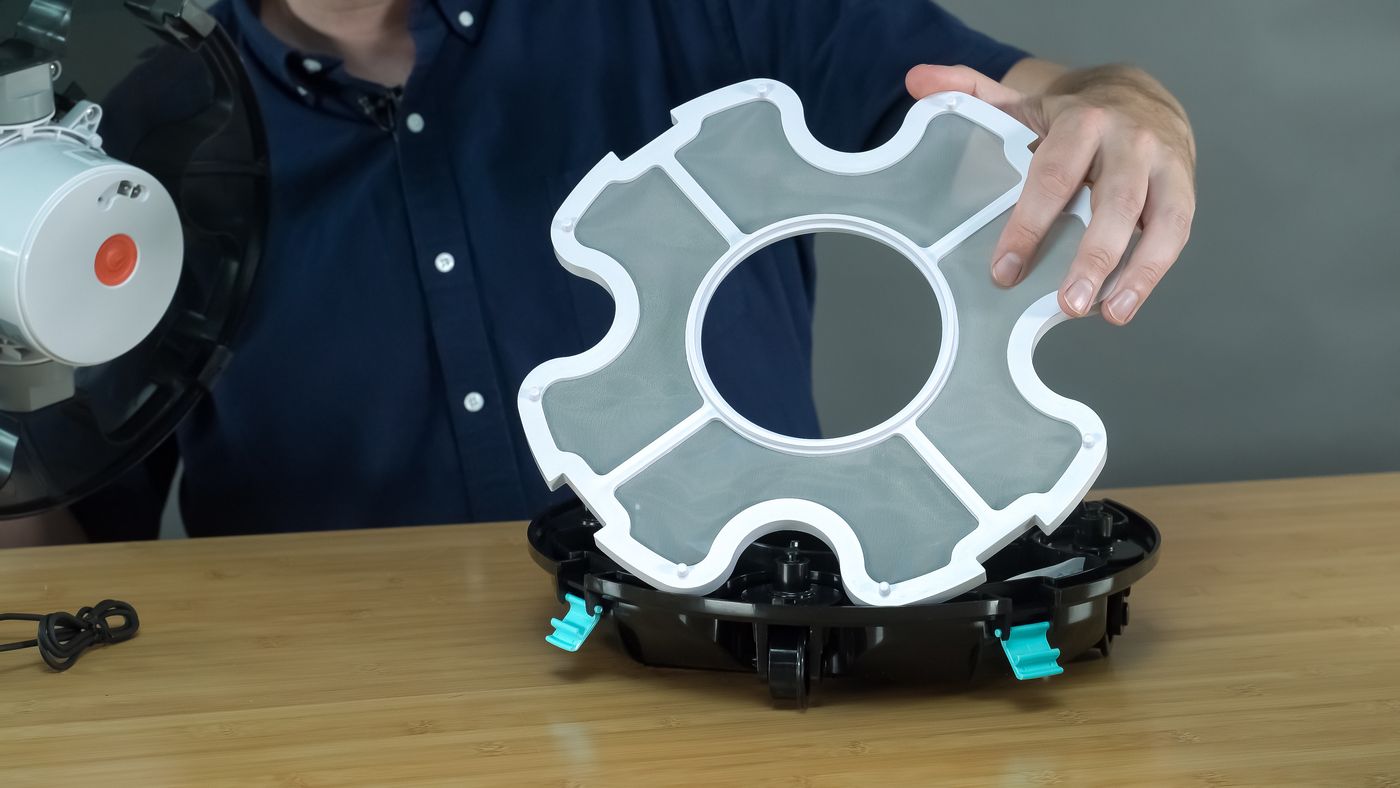
- Open it and rinse the tray. Switch the robot off. Flip the four clips outward, lift the clear cover off, and take out the mesh tray. Rinse the tray and the base until the mesh is clear. The manual wants this done after every use.
- Reassemble with the pins lined up. When you put the cover back, match the arrow on the cover buckle to its hole and make sure the pins on the cover drop into the base before you snap the clips. The manual warns the pins break if forced, and a cover that is not seated hurts cleaning.
- Fit the scrapers. The two scrapers push into the slots on the underside. They are there to improve pickup. If yours were never installed, add them, unless they catch on liner wrinkles in your pool.
- Scoop the leaves first. In our testing the suction struggled with leaves and larger debris. Net those out and let the robot handle grit and small debris.
- Keep expectations realistic on fine dust. The tray is a plastic mesh screen. Ours let a lot of fine material straight through. Fine silt is a job for the pool filter or a finer-filter robot.
Stop and call support if: there is no water flow at all with a clean tray and a full charge.
200SE Floats or Won’t Sink
- Bobs at the surface
- One edge lifts off the floor
- Drifts instead of settling
- Air trapped under the domed top cover
- Lowered in flat instead of on edge
- Cover not clipped down all the way round
- Put it in on edge. Hold the handle and lower the robot into the water vertically, as the manual shows, so the air under the dome can escape. Keep it under until the bubbles stop, then let it go.
- Rock it under water. The clear dome can hold a pocket of air. Tilt the robot side to side while it is submerged to let the last of it out.
- Check all four clips. Make sure every rim clip is snapped shut. A cover that sits proud on one side traps air and lets water bypass the tray.
- Let it settle. Once it is on the floor, leave it alone for several seconds. The Osprey 200 SE manual gives it about 5 seconds to calibrate before it starts.
Stop and call support if: it keeps floating after a careful air purge with the cover fully clipped.
200SE Hard to Retrieve
- Finishes on the far side of the pool
- Dies in the middle of the floor
- Awkward to lift without getting in
- It parks at whichever wall it reaches, not at a set spot
- Battery ran flat before it got to a wall
- No hook or pole to hand
- Wait for it to reach a wall. The design moves to the wall and stops when the run is finished or the battery is low. Give it a few minutes before going after it.
- Use a hook on a pool pole. The sister-model manual has you push the retrieving hook into a standard pool pole and lift the robot by its arched handle. Lift slowly so the water drains out of the dome.
- Switch it off once it is out. The power button is underneath, so turn the robot over on the deck and press it. The manual reminds owners to power off after every run.
- Rinse and dry before charging. Rinse the robot with fresh water, dry around the charging port, and only then plug it in.
Stop and call support if: it never makes it to a wall and always dies mid-pool on a full charge.
200SE Broken Clips, Wheels or Flipper
- A rim clip will not hold the cover down
- A wheel is cracked, missing or will not swivel
- The handle or flipper is cracked or loose
- Cover forced on with the pins out of line
- Wheels knocked against walls or handled roughly
- Robot rested upside down on the handle while charging
- Brittle plastic after sun and chlorine exposure
- Stop running it with a loose cover. If a clip no longer holds, the cover lifts, water bypasses the filter tray, and the robot can float. Do not run it until the cover closes properly.
- Line the cover up before clipping. Most clip damage comes from reassembly. Match the arrow on the cover to the hole in the base and seat the pins first, then close the clips without force.
- Check the wheel mounts. Pull each adjustable wheel by squeezing its catch and look for cracks in the stem and limiting lever. Reseat it so the lever sits fully in its lettered hole.
- Protect the flipper. Store and charge the robot on its wheels. If you take it apart for long storage, the manual suggests removing the flipper so it does not snap.
- Ask about parts before you buy anything. The manual treats broken clips, wheels and the water inlet flapper as replace-the-part repairs. The 200SE is discontinued, so confirm the part fits before ordering.
Stop and call support if: a clip, wheel or the flipper is broken and you need the correct replacement part.
What We Saw Testing the 200SE
We ran the Winny 200SE in our own test pool for our Winny 200SE review. These are the things we ran into ourselves, so you can tell a quirk of the model from a real fault.
- Stuck on liner wrinkles: Small wrinkles in the vinyl floor were enough to stop it.
- Weak on leaves: Suction handled some debris but struggled with leaves and other larger pieces.
- Missed large areas: With no timer and a short battery, it regularly left big sections of the floor uncleaned.
- Battery quit before the pool was done: In our 8x20 vinyl test pool the battery often ran out before the robot finished a full clean, especially with a lot of debris in the water.
- Hours to recharge: Once it died it needed hours on the charger, so we could realistically get one run a day out of it.
- Filter lets fine debris through: The filter is a plastic mesh screen, and fine debris passed through it and went back into the pool.
- Needed constant attention: We had to keep stepping in to recharge it, free it and restart it.
- Charging supervised: We watched it the whole time it was on the charger instead of leaving it unattended.
When to Call Winny Support
Stop troubleshooting and get the 200SE looked at if any of these are true:
- The same fault comes back right after a full clean and a restart
- You see water inside a sealed compartment, or the robot has become noticeably heavier
- There is a burning smell, a melted connector, or visible corrosion on the electrical contacts
- The battery will not take a charge, or the runtime has dropped to a fraction of what it was
- A motor is silent or grinding with nothing blocking it
Before you call, write down the serial number, find your proof of purchase, and record a 20 to 30 second video of the problem. A clip of the robot failing, plus a clear shot of any light on the robot or charger, gets a warranty claim moving faster than any description.
- Support: Winny support
- Email: support@winnypoolcleaner.com
- Manual: Winny 200SE user manual
- Warranty: 1 year. The Osprey 200 SE manual covers the motor, battery and circuit board for one year and excludes wear parts such as the filter tray and wheels.
The email address is the one printed in Winny's own manuals. The Winny website now shows only a placeholder store with no product pages, phone number or hours, so the support URL points to Wybot, the brand behind the matching Osprey 200 SE (Wybot support: support@wybotpool.com, 1-866-777-6655, Monday-Friday 9-5….
Winny 200SE Troubleshooting FAQ
Who makes the Winny 200SE?
Winny appears to be a sister brand of Wybot. Retailers sell the related Winny 200 as the Wybot Winny 200, and the 200SE shares its round body, four-clip cover, mesh tray and underside button with the Wybot Osprey 200 SE.
Is there a manual for the Winny 200SE?
We could not find an official manual published under the 200SE name. The closest match is Wybot's Osprey 200 SE manual, which shows the same parts and layout. The separate Winny 200 manual covers a different-shaped robot.
How long does the Winny 200SE battery last?
The matching Wybot manual lists a 60-minute working cycle and a 3-4 hour recharge. In our testing it often stopped before finishing a small 8x20 pool, so plan on more than one charge.
Does the Winny 200SE climb walls?
No. It is a floor-only cleaner for flat-bottomed pools. When it touches a wall the handle tips and sends it back across the floor.
Why does my Winny 200SE keep beeping?
The sister-model manual says the robot beeps continuously if it is left switched on out of the water for more than 3 minutes, and it then needs to be restarted. A buzzer that keeps sounding once the robot is fully under water points to a stuck flipper.
Can I still get parts or support for the Winny 200SE?
The 200SE has been discontinued. Winny's manuals list an email address for support, and Wybot's support team handles the equivalent Osprey models. Have your order number ready and confirm that any part fits before buying.
Still stuck after every check?
Go back to our review for how the 200SE is supposed to behave, or contact Winny with your serial number and a short video of the problem.