
The short answer
Most Wybot A1 problems trace back to three things: a filter sealed with fine debris, a battery that is not fully charged, or air trapped in the body. Rinse the filter until the water runs clear, charge until the light shows full, and let the air out before the next run.
This is the troubleshooting home for the Wybot A1. It is a cordless, battery-powered robot that cleans the floor only. Below are the 12 problems owners run into most, each with the checks we would make first and the point where it stops being a do-it-yourself fix.
Safety first: take the A1 out of the water and switch it off before you open the filter, touch the brushes, or reach near the impeller. Never charge it while it is wet at the charging contacts, and never open the sealed battery or motor housing.
A1 Quick Checks First
Run through these before you chase a specific symptom. Between them they clear up most of what goes wrong with a Wybot A1.
- Charge it all the way. Leave the A1 on charge until the light shows full, not just until it turns on. A partial charge causes short runs, weak climbing, and robots that stop in the middle of the pool.
- Rinse the filter until the water runs clear. A filter that looks clean can still be sealed with fine dust. Most pickup, climbing, and early-shutoff complaints end here.
- Let the air out. Hold the robot under the surface and rock it until the bubbles stop before you let go. Trapped air makes it float, tip, and lose grip.
- Rinse and dry the charging contacts. Pool water left on the charging port or contacts corrodes them. Rinse with fresh water and dry them before every charge.
- Check the water. Algae, very cold water, and chemistry far out of range all make a robot slip. Fix the water before you blame the machine.
Wybot A1 at a glance
- Type
- Cordless, battery powered
- Cleans
- Floor only
- Filter
- Two flat filter trays stacked under the top cover: a 180-micron mesh tray and a cotton-foam tray that sits on top of it
- Battery
- Rated 2 hours per charge, about 2.5 hours to recharge
- App
- No app
- Built for
- Flat-floor pools, mainly above-ground
- Weight
- 7.7 lb
- Warranty
- 1 year on the battery, motor and circuit board from the purchase date
A1 Won’t Turn On
- No beep and no blue light when you hold the on/off button
- Lights come on briefly, then it shuts off again
- It powers up on the deck but is dead by the time you reach the pool
- Battery is flat, often after sitting unused
- Button tapped instead of held for a full second
- Robot was left switched on out of the water and timed out
- Deep-discharged battery after months in storage
- Internal fault
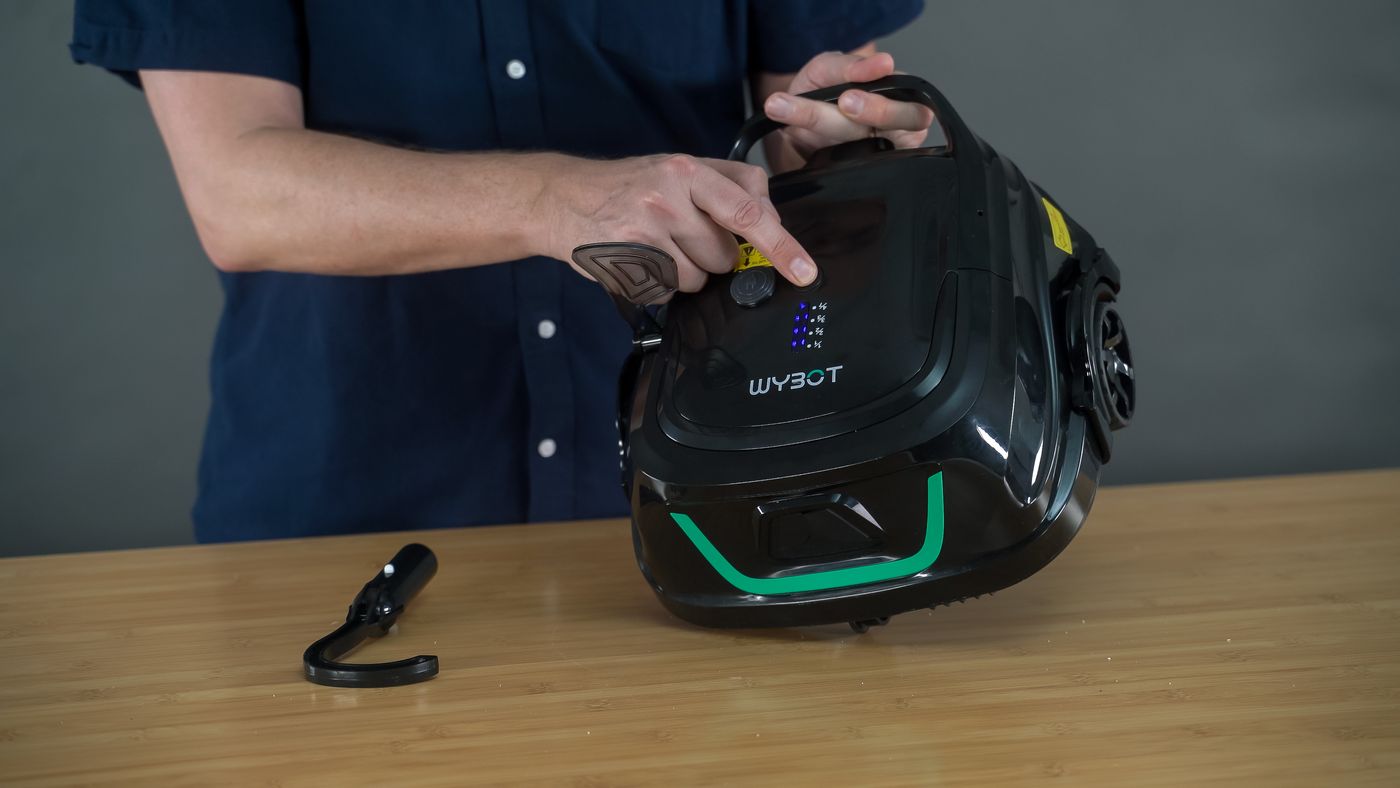
- Hold the button for a full second. The on/off button sits on the top deck next to the capped charging port. A quick tap does nothing. Hold it for about a second and listen for the beep; the LED strip should go solid blue and then flash green to show the battery level.
- Read the green lights. Count the green segments that flash at start-up. One light means 25% or less. If you get one light, or yellow flashing, it needs the charger before it will run.
- Give it a full charge. Switch it off, dry the port, and charge until all four green lights are lit. The manual rates a full charge at about 2.5 hours. Then try again.
- Get it in the water promptly. The A1 is not meant to sit switched on out of the pool. After it comes out of the water it runs a short self-check and powers off within about 3 minutes, so switch it on only when you are ready to launch it.
- Think about how long it sat. Wybot asks you to top the battery up every three months in the off-season. A robot that sat flat all winter may not wake up, and the manual says to contact support in that case instead of opening it.
Stop and call support if: there is no beep and no light after a full 2.5-hour charge, or the robot has been stored flat for months and will not take a charge.
A1 Won’t Charge
- Green battery lights never fill up
- No light on the wall charger
- Battery level is the same after hours on the charger
- Robot left switched on while plugged in
- Water or grit in the charging port under the rubber cap
- Plug not fully seated
- Charging somewhere too hot or too cold
- Failed charger
- Switch the robot off first. Wybot's support FAQ for the A1 says to turn the device off before you plug it in, because charging while it is on can cause charging problems. Use the on/off button on the top deck and confirm the LED strip is dark before you connect the charger.
- Dry the charging port. Lift the rubber cap on the top deck and look inside the port. If you see water, shake it out and let it air-dry before plugging in. Wybot warns that a damp port can stop charging and corrode the contacts.
- Reseat the charger. Push the charger plug all the way into the port and try a different wall outlet. Use only the charger that came with the A1.
- Charge in the shade, away from the pool. The manual wants the robot at least 3 m (about 10 ft) from the pool edge while charging, out of direct sun, and between 32 and 95 degrees F. A hot deck in full sun is the wrong place.
- Check the charger light. If the indicator on the charger itself does nothing, the manual's troubleshooting table points to a damaged charger. That is a replacement part, not a repair.
Stop and call support if: the charger's own indicator stays dead on a known-good outlet, the port looks corroded, or the robot gets hot or leaks anything while charging. Unplug it and stop.
A1 Short Battery Life
- Runs about an hour instead of the rated two
- Parks at the wall with yellow flashing well before the pool is done
- Needs a recharge to finish one pool
- It was not fully charged when the run started
- A shorter eco time (60, 40 or 30 minutes) is selected instead of the 120-minute default
- Clogged filter trays making the pump work harder
- Battery wear, or a battery that sat flat in storage
- The pool is simply bigger than one charge covers
- Start from four green lights. Charge until all four green segments are lit before every run. Wybot's FAQ specifically says to make sure the A1 is fully charged before choosing a cycle, because the eco times assume a full battery.
- Check which eco time is set. At power-on, when the strip turns purple, look at which segment is lit. The top position is the 120-minute default. If it is on 60, 40 or 30, the robot is doing what it was told, not dying early.
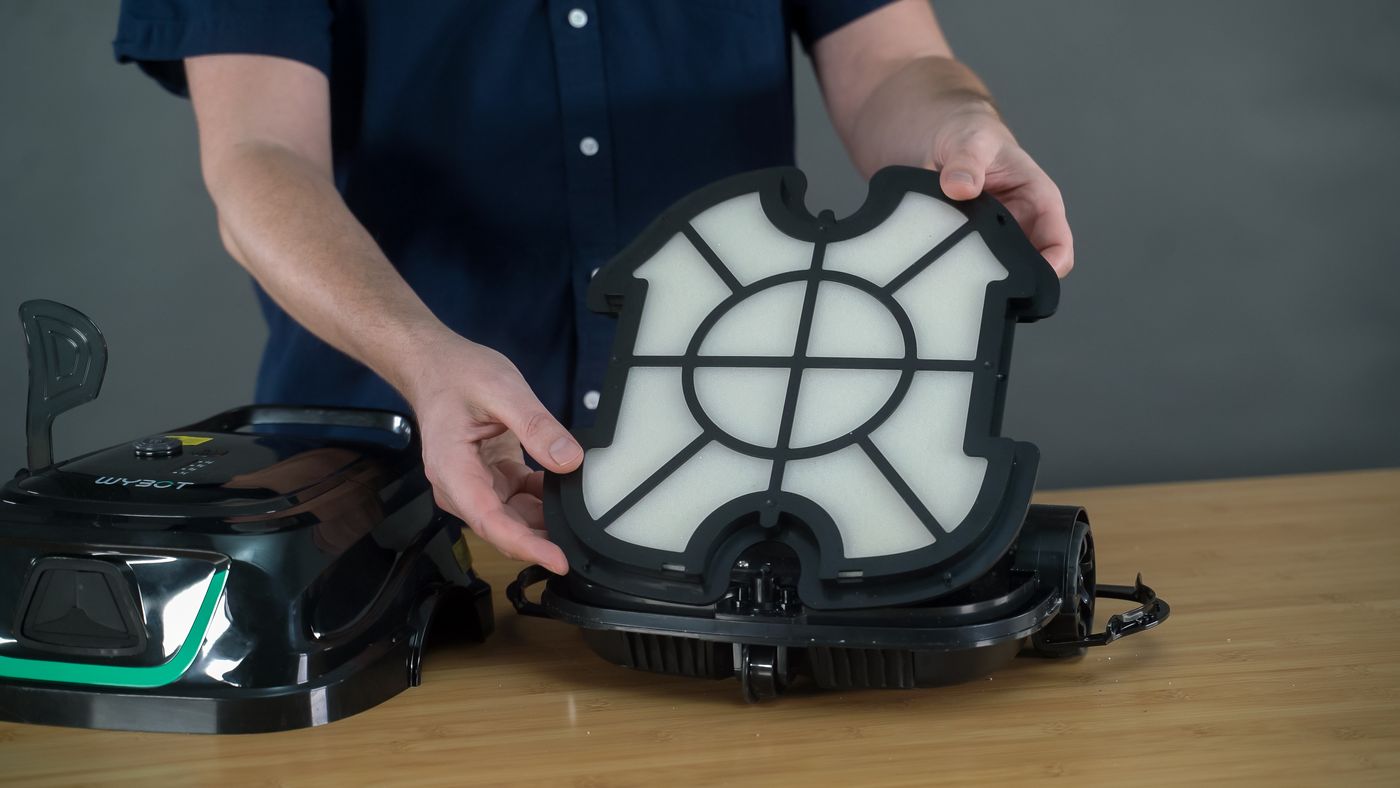
- Rinse both filter trays. Open the two side fasteners, lift the top cover, and pull the cotton-foam tray and the 180-micron tray. Hose the mesh tray and hand-wash the foam. Do it while they are still wet; dried-on dirt is harder to get out.
- Time one clean run. With a full charge, clean trays and the 120-minute setting, time how long it runs. In our testing it lasted about an hour, so an hour is not necessarily a defect on this model.
- Plan on two charges for bigger pools. If one run does not cover your floor, recharge for about 2.5 hours and run it again. There is no setting that stretches a charge beyond what the battery holds.
Stop and call support if: runtime on a full charge with clean trays drops well below what the same robot gave you when it was new, inside the one-year battery warranty.
A1 Stops Mid-Cycle or Restarts on Its Own
- Stops at the wall partway through the pool
- Pauses at the edge, then heads off again
- Starts cleaning again by itself about 10 minutes after it parked
- Runs for a few minutes on the deck after you pull it out
- Normal end of a shortened eco run
- Low battery (yellow flashing)
- Normal edge-cleaning pause
- Robot left in the pool after an eco run, so it restarted
- Normal post-run self-check
- Tell a pause from a stop. A short pause at the wall followed by a change of direction is normal. Wybot's FAQ says the A1 hesitates at the edges to clean them before carrying on across the floor.
- Look at the light. Flashing yellow at the wall means low battery or self-parking, and it is finished for now. Red means a fault. Flashing blue means it is still working.
- Check the eco time you chose. The 60, 40 and 30 minute settings end the run early on purpose so one charge can be split into several shorter cleanings. If you wanted one long run, pick the 120-minute default at the purple light.
- Pull it within about 10 minutes of a short run. After a shortened eco run finishes, the manual says to take the robot out within roughly 10 minutes. Leave it longer and it starts again and keeps going until the battery is low.
- Expect a short self-check on the deck. Once it is out of the water the A1 restarts briefly to check itself, then powers off after about 3 minutes. That is by design. Switch it off by hand if you are about to open the cover.
Stop and call support if: it stops with a red light, or it quits within minutes of launch on a full charge with clean filter trays.
A1 Not Moving
- Sits on the floor with lights on but does not travel
- Buzzer keeps sounding after it is fully under water
- No water coming out of the outlet
- Reaches a wall and stays there instead of coming back
- Low battery
- Flipper jammed or not seated in its socket
- Debris in the flipper pocket or the water channel
- Clogged filter trays choking the jet
- Impeller or internal fault
- Rule out the battery. The manual lists a silent buzzer or an impeller that will not spin at power-on as a low-battery symptom first. Charge to four green lights and try again before anything else.
- Free the flipper. Take the robot out and switch it off. The flipper is the clear paddle clipped into the cylinder on the right side of the top. Swing it by hand through its full travel. If it binds, pull it out, rinse the socket, and push it back in with the notch lined up with the groove.
- Clear the pocket the flipper moves in. If the flipper will not stand up when the robot touches a wall, the manual's fix is to clean out the cavity it moves in. Pick out leaf stems, hair and grit by hand.
- Clear the water channel. If the flipper stands up but the robot still will not reverse, the manual blames a blocked water channel. With the robot off and the top cover removed, look through the outlet and the path from the pump and remove anything lodged there.
- Rinse the filter trays and relaunch. This robot moves on the water it pumps, so a packed cotton-foam tray slows it down or stops it. Wybot says to leave the foam tray out when the pool is very dirty. Rinse both trays, refit the cover, and test again.
Stop and call support if: the buzzer keeps alarming under water after the flipper and channel are clear, or the impeller does not spin on a full charge. The motor section is sealed and the manual says not to open it.
A1 Gets Stuck
- Stalls on a liner wrinkle, drain cover or floor seam
- Stops at the bottom of a slope
- Hangs up at steps or a ladder
- Bumps the same wall repeatedly without turning around
- The A1 is built for flat floors and has little climbing ability
- Raised obstacles higher than it can roll over
- Flipper not reversing the robot at the wall
- Cotton-foam tray clogged in a dirty pool
- Give it time before you rescue it. Wybot's FAQ says the A1 can take roughly 2 to 10 minutes to work itself free of a small wrinkle or a low drain. Watch it for a while before you reach for the pole.
- Remove what you can from the floor. Take out ladders, toys and loose fittings before a run. The manual is blunt that the machine wants a flat floor and that tall obstacles will trap it.
- Check the flipper. If it is stuck against a wall, lift it out and make sure the flipper swings freely and its pocket is clean. A flipper that cannot stand up cannot send the robot back.
- Leave the foam tray out in a dirty pool. The manual says not to use the cotton-foam tray when the pool is heavily soiled, because the robot bogs down easily with it fitted. Run the 180-micron tray alone for the first clean-up, then add the foam for routine runs.
- Accept the limit on slopes and steps. If your floor has a deep-end slope or a raised main drain, this robot will keep stopping there. In our own notes we flagged that it may stall on small slopes and bumps. It is not adjustable.
Stop and call support if: it will not reverse at walls on a flat, clear floor even with a free flipper and a clean water channel.
A1 Misses Spots
- Cleans the same strip of floor over and over
- Leaves one end or the corners of the pool untouched
- Travels in a tight repeating pattern in a round pool
- Adjustable wheel angle does not suit the pool shape
- Pool pump running and pushing the robot around
- Run time too short for the floor area
- No mapping; the path is set by how it bounces off walls
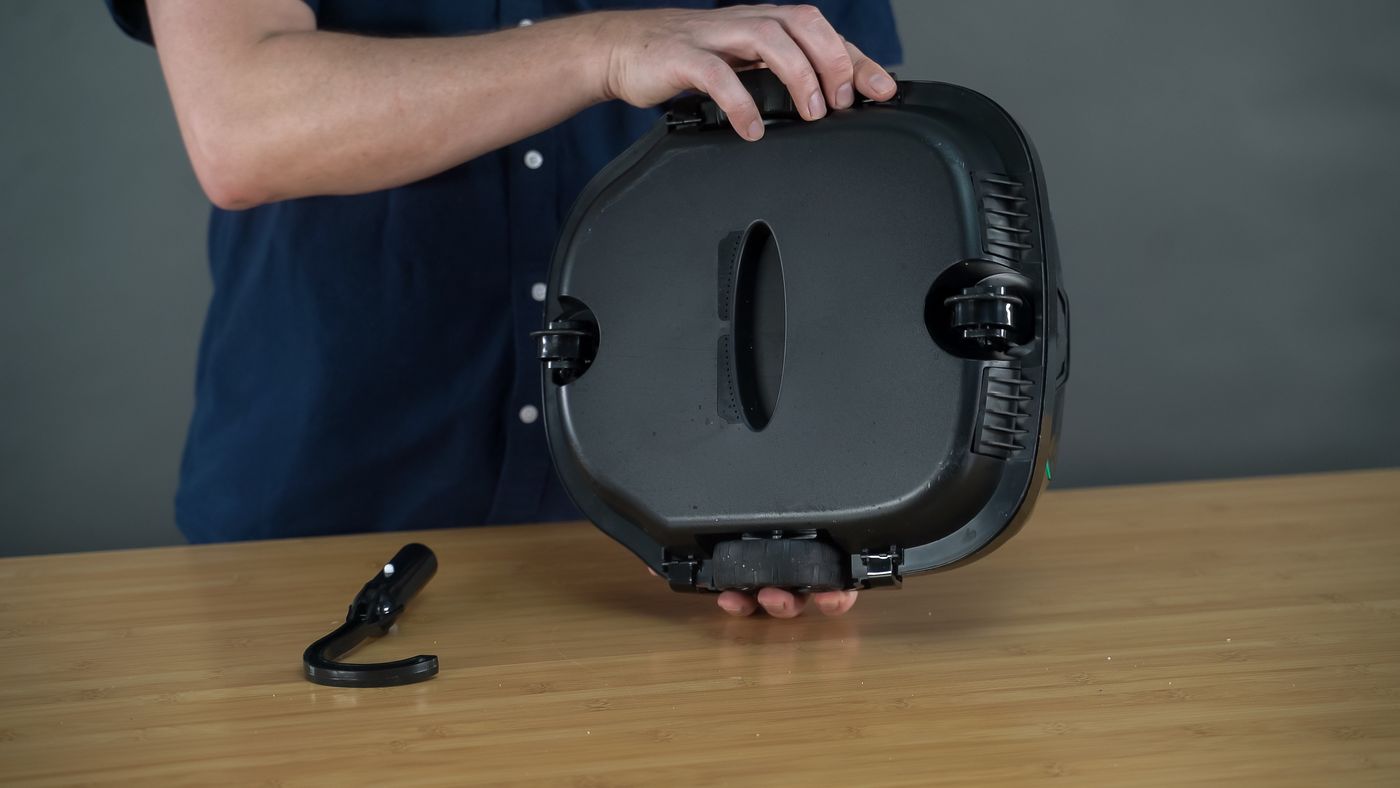
- Turn the pool pump off. The manual's troubleshooting table lists a running circulation system as a cause of poor floor coverage. Shut the pump off for the run so return jets and suction are not steering a 7.7 lb robot.
- Find the two adjustable wheels. Flip the robot over. The front and rear caster wheels each sit in a mount with positions marked A, B, C and D. A small limiting lever on each wheel kit drops into one of those holes and sets the angle the robot leaves a wall at.
- Change the wheel combination. Squeeze the catch on the wheel stem toward the inside and the wheel kit pulls out. Per the manual, A-C is the default for most pools, A-B gives a smaller rebound angle, and B-C is meant for round pools. Refit and run a test.
- Use the full 120-minute run. A 30 or 40 minute eco run will not cover much floor. Select the default 120-minute setting at the purple light when you want the whole pool done.
- Drop it in a different spot each time. Because the pattern depends on where it starts, launching from a different side on alternate runs evens out the coverage over a week.
Stop and call support if: coverage is poor in a simple rectangular pool with the pump off and you have tried the wheel combinations.
A1 Not Picking Up Debris
- Leaves and larger debris are still on the floor after a run
- Fine dust clouds up behind the robot
- Debris cavity is nearly empty after a full cycle
- Filter trays clogged
- Both trays fitted in a dirty pool, cutting flow
- Trays or top cover not seated, so water bypasses them
- Debris too large for this robot's suction
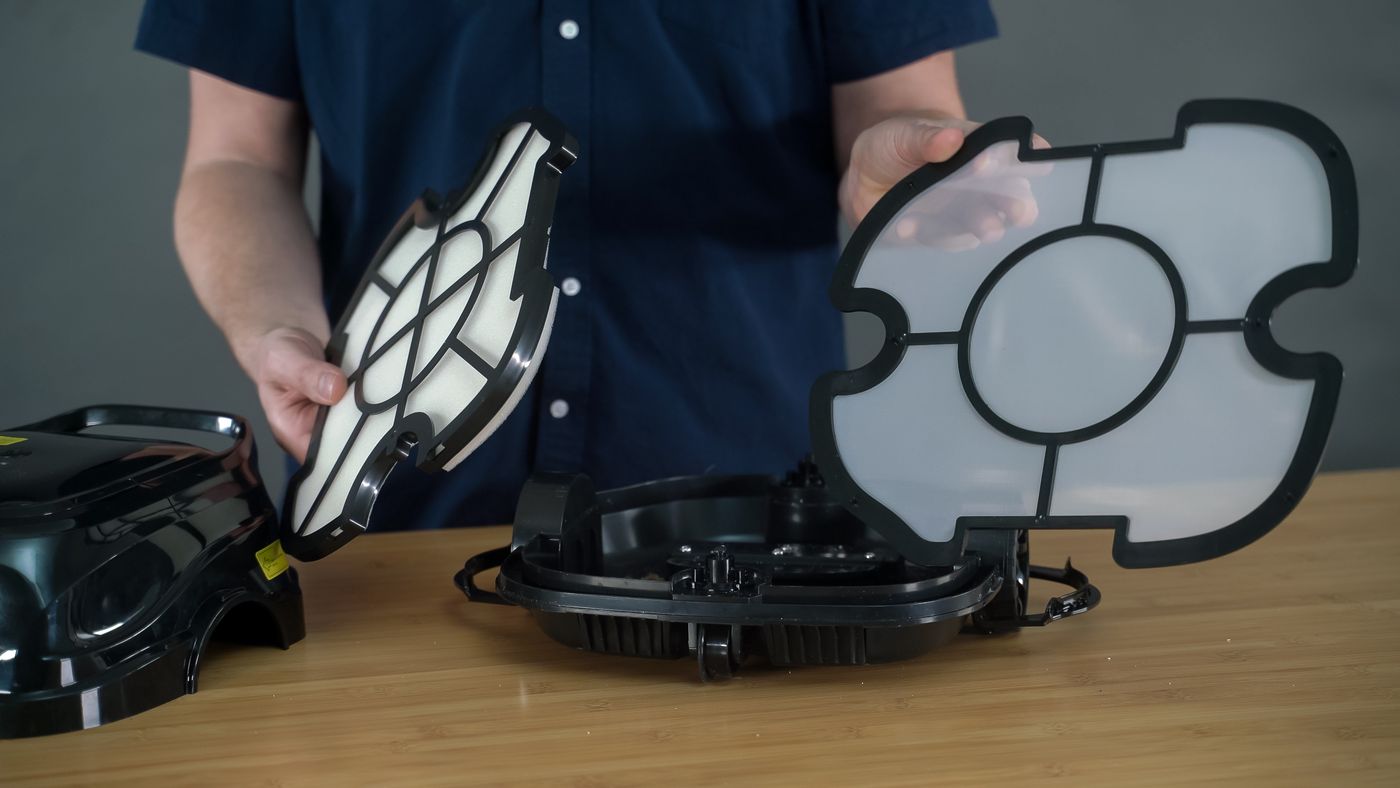
- Open it up and empty it. Switch the robot off. Release the fastener on each side, lift the top cover straight up, and take out both trays. Tip the debris out of the cavity in the base.
- Clean the trays properly. Shake the loose debris off, hose the 180-micron mesh tray, and hand-wash the cotton foam. The manual says to clean them before they dry out.
- Try the mesh tray on its own. The mesh tray can be used alone or with the foam on top. In our testing the second layer seemed to cost suction, so run mesh-only when you are after leaves and add the foam back for fine dirt.
- Reassemble so it seals. Seat the trays flat in the base, drop the top cover on, and snap both side fasteners closed. A cover that is not latched lets water skip the filter.
- Scoop the big stuff first. We found the A1 fine on small leaves and poor on anything larger. Net out big leaves and twigs before the run so the intake slot on the underside does not get bridged over.
Stop and call support if: there is little or no water flow from the outlet with clean trays and a full battery.
A1 Floats or Won’t Sink
- Bobs at the surface after you let go
- One end lifts off the floor
- Drifts instead of settling and calibrating
- Air trapped under the top cover
- Dry cotton-foam tray holding air
- Lowered in flat instead of on end
- Water shallower than the 1.98 ft minimum
- Lower it in on end. Hold the handle and put the robot into the water vertically, as the manual shows, so air can run out as water runs in. Hold it under until the bubbles stop.
- Let it sit on the floor. Once it sinks it needs about 15-20 seconds on the floor to calibrate. Do not nudge it with the pole during that time. The light goes from solid to flashing blue when it starts.
- Wet the foam tray. A bone-dry cotton-foam tray holds a lot of air. If it keeps floating, pull the robot out, dunk and squeeze the foam under water, and refit it.
- Check the cover is latched. Make sure both side fasteners are snapped shut. A loose cover can trap an air pocket and let the robot ride up.
- Check your water depth. The manual's minimum is 1.98 ft (60 cm). In a very shallow pool or on a tanning ledge it will not stay planted.
Stop and call support if: it still floats after it has been fully purged of air with a wet foam tray and a latched cover.
A1 Hard to Retrieve
- Ends the run in the middle of the pool or on the far side
- Hook slips off the handle
- Very heavy to lift out
- Battery ran out before it reached a wall
- It parked at whichever wall was closest, not where you are standing
- Lifting it flat so it comes up full of water
- Wait for the park. When the run ends or the battery gets low the A1 heads for a wall and stops there with yellow flashing. Give it a few minutes to get there before you go after it.
- Fit the hook to a pole. The included hook pushes into the end of a standard pool pole. Reach down, catch the carry handle on top of the robot, and bring it up slowly.
- Lift it on end. As it clears the surface, tip it so it hangs vertically. The manual shows this so the water inside drains through the outlet quickly and the lift gets lighter.
- Do not pull on the flipper. Hook the handle, not the clear flipper. The flipper is a thin plastic part that was never meant to carry the robot's weight.
- Avoid stranding it. If it regularly dies mid-pool, start from a full charge and clean trays, or choose a shorter eco time so it parks with battery to spare.
Stop and call support if: it never parks at a wall and always stops dead in open water, even on short runs from a full charge.
A1 Red or Yellow Light
- Red light, solid or flashing
- Yellow light flashing
- Buzzer sounding
- Yellow: low battery or normal self-parking
- Red: a fault, most often a jammed flipper or blocked water path
- Buzzer with no movement: low battery or an internal fault
- Yellow means charge it. Flashing yellow is not an error. Hook the robot out, switch it off, dry the port and charge it.
- On red, take it out and switch it off. Wybot documents red only as a general fault. There is no chart of blink counts for the A1, so do not try to count flashes.
- Work the flipper and clear the channel. Swing the flipper by hand, clean its pocket, and check the water channel and outlet for debris. These are the faults the manual's table actually lists.
- Clean the filter trays. Open the side fasteners, lift the cover, and rinse both trays. Refit everything and latch the cover.
- Recharge fully and retest. Charge to four green lights, then relaunch. If red returns straight away, stop there.
Stop and call support if: red comes back after a full charge with a free flipper, a clear water channel and clean trays.
A1 Water Inside or Signs of a Leak
- New robot arrived damp or with water marks
- Water pours out when you lift it from the pool
- Liquid or residue around the sealed motor section
- Factory water test before packing (normal)
- Normal flooding of the debris cavity during use
- Failed seal on the sealed motor and battery section (not normal)
- Damp out of the box is expected. Wybot says every unit is run under water before it is packed, so a little moisture or water staining on a new A1 does not mean it was used.
- Water in the debris cavity is normal. The area under the top cover floods by design. Lifting the robot out on end lets it drain through the outlet.
- Inspect the sealed section. The sealed part under the cover holds the motor, battery and electronics. If you see liquid seeping from it, the manual says to stop charging and stop running the robot.
- Do not open it. The manual tells owners not to take the sealed section apart, and the warranty does not cover damage from unauthorized disassembly. Photograph what you see for the claim.
Stop and call support if: anything leaks from the sealed motor and battery section, or the robot fails after you notice moisture where it should be dry.
A1 Lights and What They Mean
These are the indicator states listed in the official Wybot material for the Wybot A1. If what you see is not here, check the manual for your exact production run before acting on it.
Lower it into the pool by the handle. It calibrates on the floor for roughly 15-20 seconds, then starts.
Nothing to do. Leave it alone until it parks at the wall.
If you see one or two lights, charge before you start a run or it will quit early.
Tap the on/off button to move between 120 minutes (default), 60, 40 and 30 minutes, then put the robot in the pool.
Hook it out of the pool and put it on the charger.
Take it out, switch it off, and work through the flipper and impeller checks. If red comes back on a full charge, contact Wybot support.
What We Saw Testing the A1
We ran the Wybot A1 in our own test pool for our Wybot A1 review. These are the things we ran into ourselves, so you can tell a quirk of the model from a real fault.
- Larger debris left behind: It picked up small leaves without trouble but struggled with anything bigger in our pool.
- Floor only: It cleans the floor and nothing else. It does not climb walls or steps.
- Slopes, texture and bumps: We did not have a slope to test on, but based on owner reports we flagged that it can stall on textured surfaces, small slopes and bumps.
- Charging needs watching: We did not leave it charging unattended. We stayed near it every time it was plugged in.
- Runtime about half the rating: The A1 is sold as a two-hour robot, but in our testing it ran closer to one hour before it needed the charger again.
- Second filter layer costs suction: We liked that it has a mesh tray plus a cotton tray, but the extra layer appeared to take suction away.
- Fine on a flat floor: In our completely flat container pool it got around the whole floor reasonably well.
When to Call Wybot Support
Stop troubleshooting and get the A1 looked at if any of these are true:
- The same fault comes back right after a full clean and a restart
- You see water inside a sealed compartment, or the robot has become noticeably heavier
- There is a burning smell, a melted connector, or visible corrosion on the electrical contacts
- The battery will not take a charge, or the runtime has dropped to a fraction of what it was
- A motor is silent or grinding with nothing blocking it
Before you call, write down the serial number, find your proof of purchase, and record a 20 to 30 second video of the problem. A clip of the robot failing, plus a clear shot of any light on the robot or charger, gets a warranty claim moving faster than any description.
- Support: Wybot support
- Phone: 1-866-777-6655 (Monday-Friday, 9:00 AM-5:00 PM Pacific)
- Email: support@wybotpool.com
- Manual: Wybot A1 user manual
- Warranty: 1 year on the battery, motor and circuit board from the purchase date
One-year warranty on battery, motor and circuit board for the original buyer only. Have your order number ready (Wybot asks for the website or Amazon order number on every claim). Damage from opening the sealed section is not covered.
Wybot A1 Troubleshooting FAQ
Does the Wybot A1 climb walls?
No. The A1 is a floor-only cleaner and the manual says it does not do walls or the waterline. If it stops at the wall and turns back, that is how it is supposed to work.
How long does the Wybot A1 battery last?
Wybot rates it at 2 hours per charge with about 2.5 hours to recharge. In our testing it ran closer to an hour. Start from four green lights and clean filter trays to get the most out of it.
What does the yellow light on the Wybot A1 mean?
Flashing yellow means the battery is low or the robot is parking itself at the wall. Take it out of the pool and charge it.
What does a red light on the Wybot A1 mean?
Red, solid or flashing, is a general fault light. Check that the flipper swings freely, clear its pocket and the water channel, rinse the filter trays and recharge. If red returns, contact Wybot support.
Why does my Wybot A1 start again after it finished?
If you picked a shortened eco time, the robot expects to be taken out within about 10 minutes of finishing. Left in the pool, it restarts and runs until the battery is low. It also runs a brief self-check after you lift it out, then shuts off after about 3 minutes.
Does the Wybot A1 have an app?
The A1 manual describes no app. Everything is done with the single on/off button and the LED strip on top of the robot.
Still stuck after every check?
Go back to our review for how the A1 is supposed to behave, or contact Wybot with your serial number and a short video of the problem.